
Profile Bar — An Oracle APEX Region Plug-in That Turns the Navigation Bar Into a Real User Menu
A free, MIT-licensed region plug-in: avatar straight out of a BLOB column, online status dot, a nested dropdown menu built from one SQL query, and a logout button in four styles.
Every application I hand over has the same thing in the top right corner: the user's photo, their name, and a menu behind it. Profile, notifications, billing, support, settings, sign out. Nobody ever asks for it explicitly — they just expect it, because every other application they use has one.
Oracle APEX gives you the Navigation Bar List for this, and it works fine as long as your ambition stops at a flat list of text links. The moment you want a photo from the database, a second line with the email address, an indented sub-entry, or a coloured icon per row, you end up in the same place every time: a chunk of CSS on Page 0, a Dynamic Content region that reads a BLOB and builds HTML with ||, and a list template you copied and edited until it stopped fighting you.
I built that same thing for the third time this year. So this time I packaged it as a region type plug-in. It renders the whole bar, reads the user's data out of your own table without any extra page or ORDS handler, and takes its entire menu — labels, icons, colours, links and nesting — from a single SQL query.
.sql export, import it, done — no database objects, no dependencies.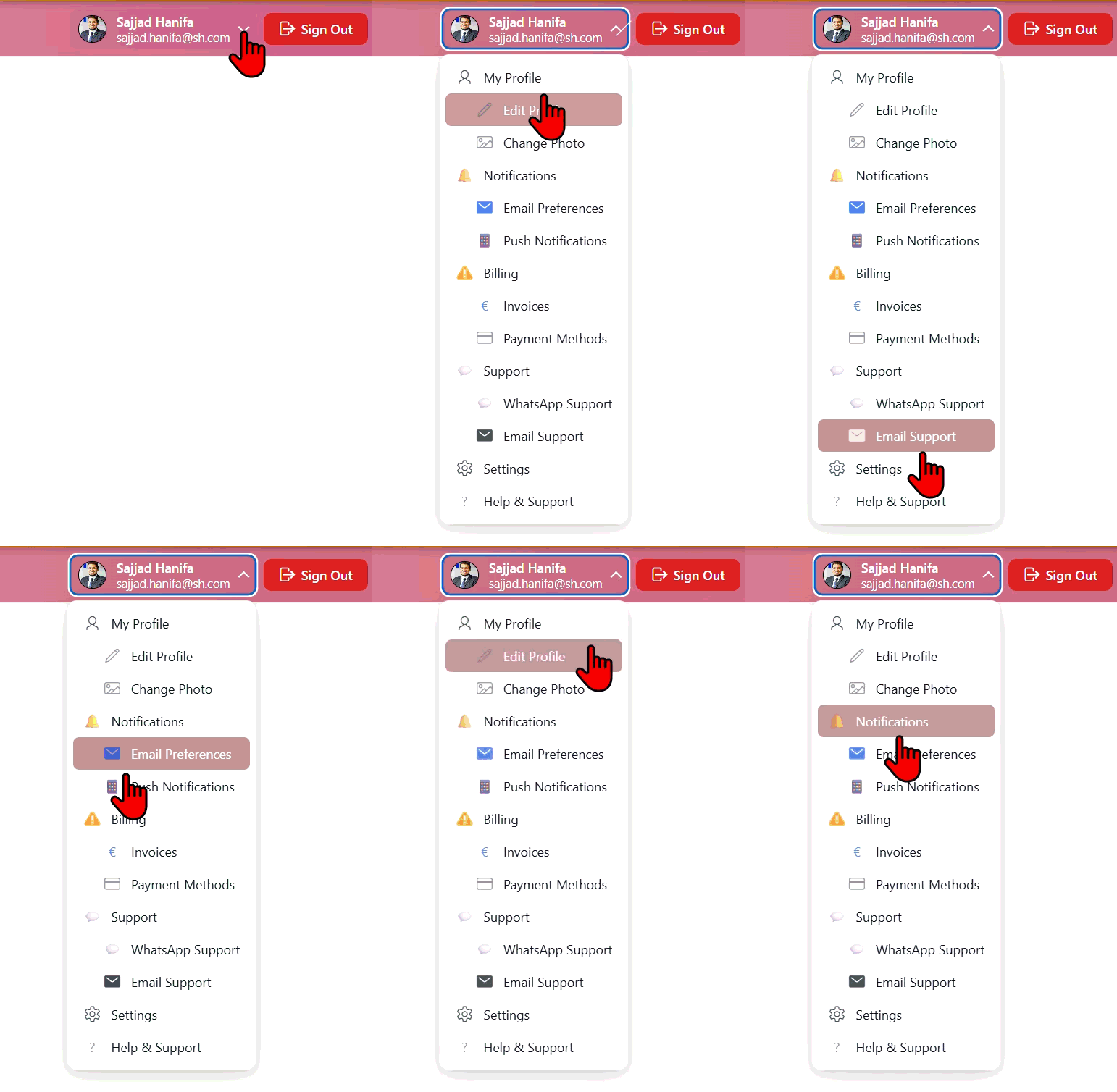
What the Plug-in Does
The design rule I set myself was simple: nothing that can come from the database should have to be typed into an attribute twice. You point the plug-in at your users table once, you write one query for the menu, and everything else is a switch or a colour picker.
apex_util.get_blob_file call, no extra page and no ORDS handler in the wayMAIN/SUB flag that decides the indentationGrab region_type_plugin_profile_bar.sql from the repository. It is a component export that already contains the render function, the stylesheet and the JavaScript, so there is nothing else to upload.
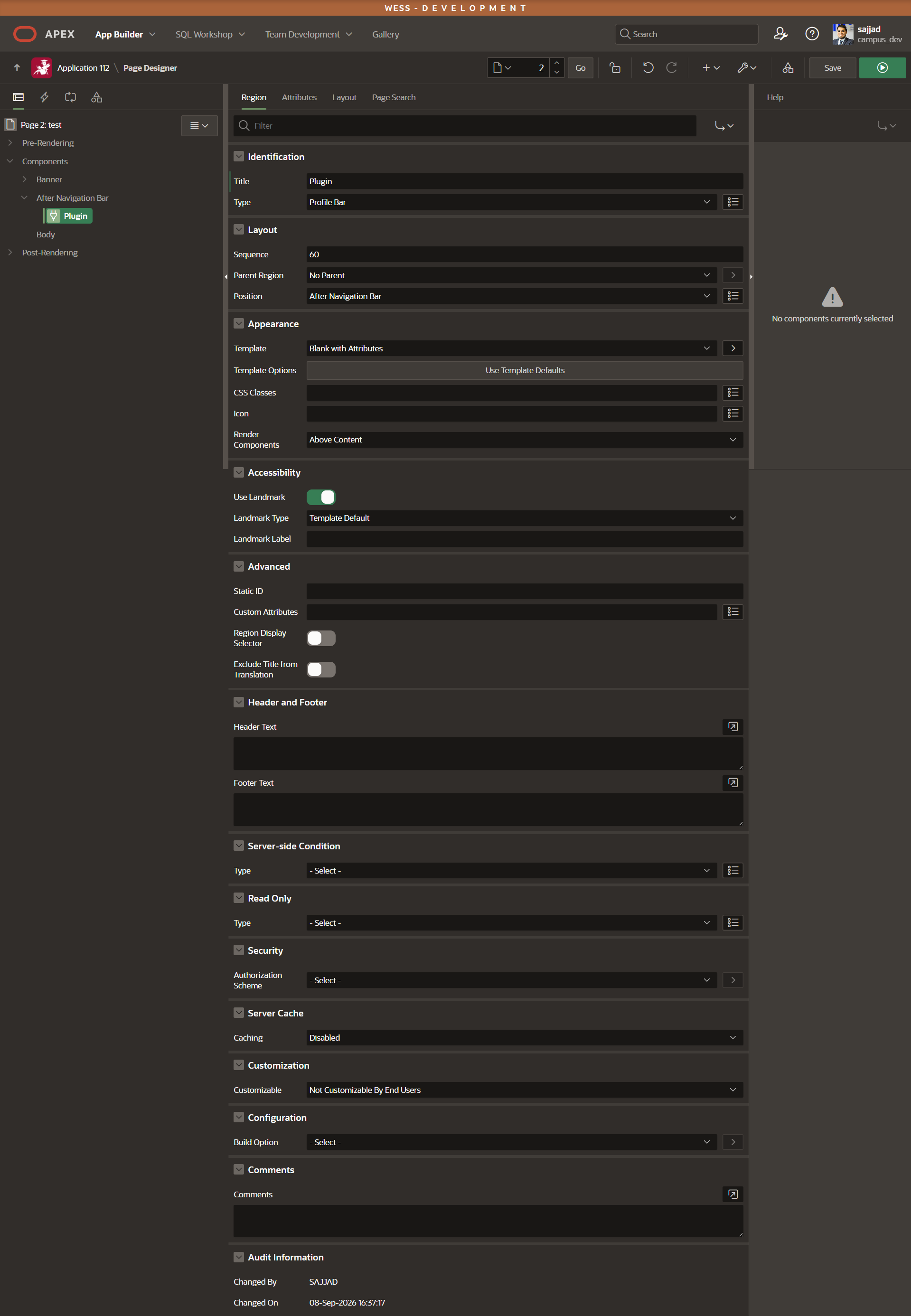
Then create the region. Because the bar belongs on every page, it goes on the global page (Page 0), and the placement matters more than it looks:
| Region setting | Value |
|---|---|
| Type | Profile Bar |
| Position | After Navigation Bar |
| Template | Blank with Attributes |
The template is the part people get wrong. Anything with a region header draws a box around the bar; Blank with Attributes gives you the markup and nothing else, which is exactly what you want inside the navigation bar.
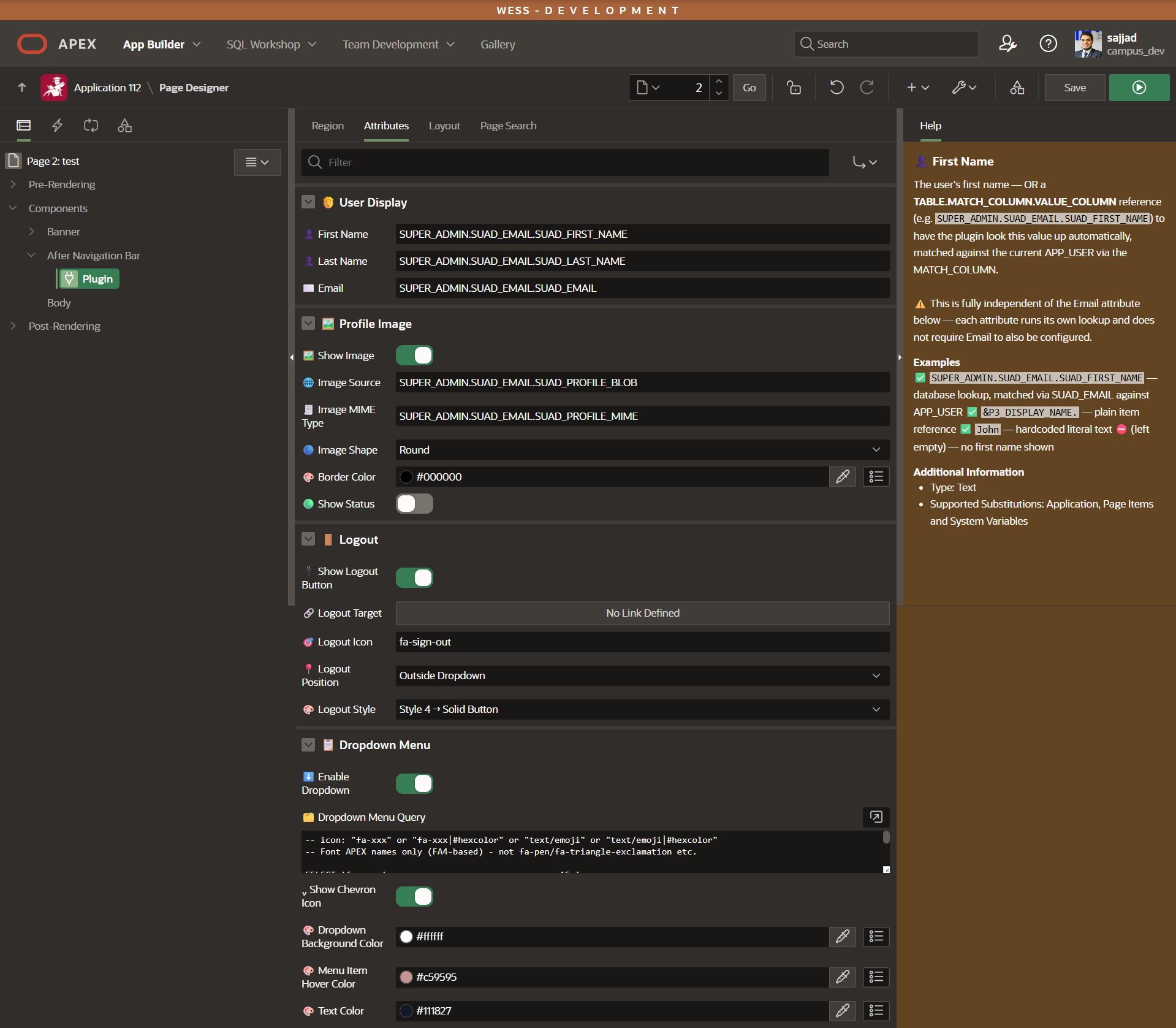
This is where the plug-in tries to save you the most work. Every text attribute — first name, last name, email, image, MIME type — accepts three different kinds of value, and the plug-in works out which one you gave it:
SUPER_ADMIN.SUAD_EMAIL.SUAD_FIRST_NAME   -- TABLE.MATCH_COLUMN.VALUE_COLUMN
                                         -- looked up automatically, matched
                                         -- against APP_USER via MATCH_COLUMN

&P3_DISPLAY_NAME.                        -- a plain item reference

John                                     -- hardcoded literal text
The important detail is that each attribute runs its own lookup. Configuring the email is not a prerequisite for the first name, and the image does not depend on either of them. You can read the name from a table, take the email from a page item, and hardcode nothing at all — or the other way around. If a lookup finds no matching row, the email falls back to APP_USER and the avatar falls back to initials, so the bar never renders half-broken.
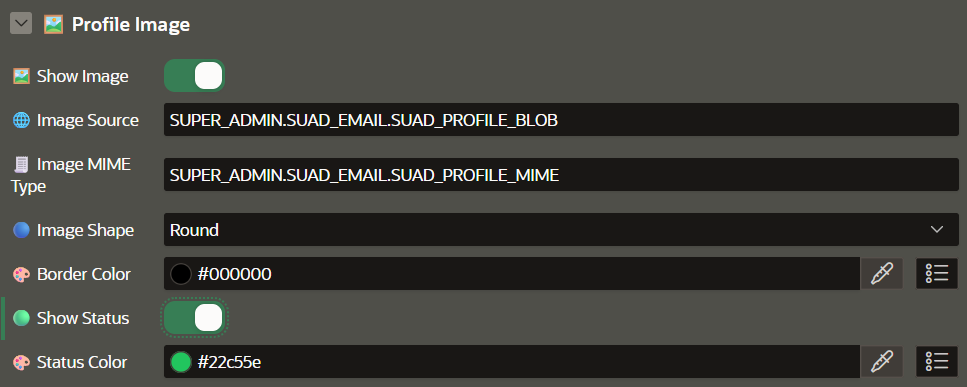
The avatar deserves one extra note. Embedding an image as Base64 inflates it by roughly a third, and a navigation bar that ships a two-megabyte photo on every single page request is a problem you will only notice in production. So there is a hard ceiling: anything above 300 KB is skipped and the initials are drawn instead. If your users upload photos straight from their phone, resize them on the way into the table — the plug-in will not do it for you, and it should not.
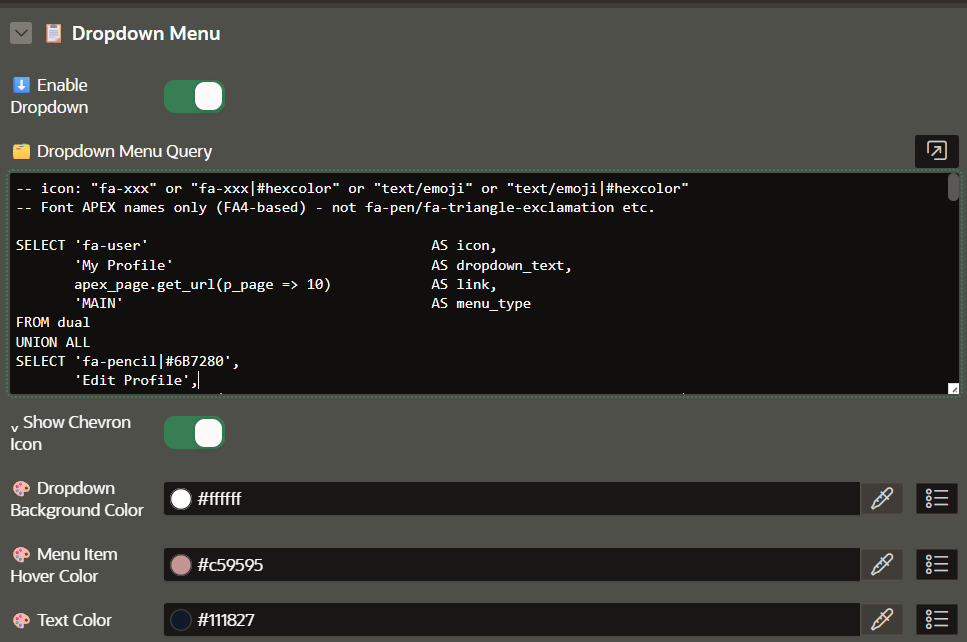
This is the part I like most. There is no list, no list template, no sequence column and no hierarchy table. The dropdown is one query that returns exactly four columns, in this order:
| Column | What it holds |
|---|---|
| 1 icon | A Font APEX class (fa-user), plain text or an emoji — optionally followed by |#hexcolor |
| 2 text | The label shown in the row |
| 3 link | Any target — an apex_page.get_url call, an external URL, a mailto: |
| 4 menu_type | MAIN for a top-level row, SUB for an indented row underneath it |
Order the query the way the menu should read — the rows are rendered in the order they arrive, and a SUB row belongs to the MAIN row above it. Here is a shortened version of the query that produces the menu in the animation at the top:
-- icon: "fa-xxx" or "fa-xxx|#hexcolor" or "text/emoji" or "text/emoji|#hexcolor"
-- Font APEX names only (FA4-based) - not fa-pen/fa-triangle-exclamation etc.

SELECT 'fa-user'                        AS icon,
       'My Profile'                     AS dropdown_text,
       apex_page.get_url(p_page => 10)  AS link,
       'MAIN'                           AS menu_type
FROM dual
UNION ALL
SELECT 'fa-pencil|#6B7280',
       'Edit Profile',
       apex_page.get_url(p_page => 10, p_items => 'P10_MODE', p_values => 'EDIT'),
       'SUB'
FROM dual
UNION ALL
SELECT '🔔',
       'Notifications',
       apex_page.get_url(p_page => 11),
       'MAIN'
FROM dual
UNION ALL
SELECT 'fa-exclamation-triangle|#F59E0B',
       'Billing',
       apex_page.get_url(p_page => 50),
       'MAIN'
FROM dual
UNION ALL
SELECT '€|#2563EB',
       'Invoices',
       apex_page.get_url(p_page => 50, p_items => 'P50_TAB', p_values => 'INVOICES'),
       'SUB'
FROM dual
UNION ALL
SELECT '💬|#25D366',
       'WhatsApp Support',
       'https://wa.me/491234567890',
       'SUB'
FROM dual
Because it is a query and not a static list, the menu can do things a Navigation Bar List cannot without a template rewrite. Filter the rows by an authorisation scheme and an entry disappears for the users who should not see it. Join to a table and let an administrator maintain the menu from a form. Add a CASE on the icon colour and the billing entry turns red when an invoice is overdue.
The Logout Button, Four Ways
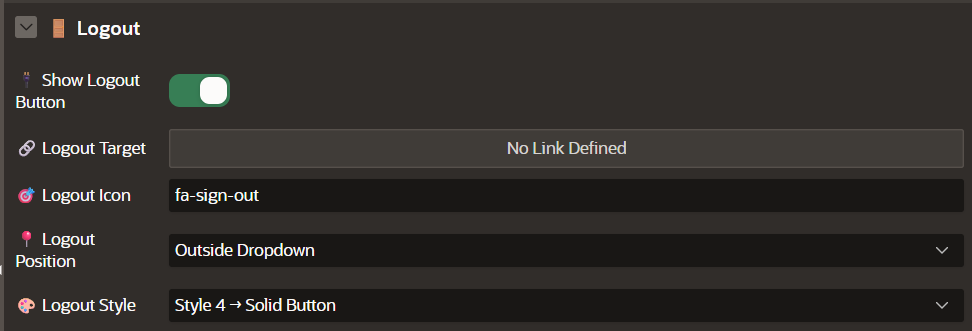
Logging out is the one action in that menu that people look for under pressure, so it gets its own attribute group instead of being just another menu row. You decide where it sits and how loud it is:
| Style | Looks like | Good for |
|---|---|---|
| Style 1 | Icon only | Dense admin bars where space is tight |
| Style 2 | Outlined icon | The same, but visible on a busy background |
| Style 3 | Icon + text | Applications with non-technical users |
| Style 4 | Solid button | When sign-out should be unmissable — the one in the animation above |
Set Logout Position to Inside Dropdown Menu and it becomes the last entry of the panel instead, which is the more conventional layout. Either way the target is a normal link attribute, so &LOGOUT_URL., a custom logout page or your own procedure all work.
How It Is Built
The render function reads its attributes positionally, resolves every value through the same helper — literal, item reference or table lookup — and writes the markup itself. There is no template engine and no jQuery; the output is a handful of nested <div> elements with class names prefixed sh-um- so nothing can collide with Universal Theme.
IF v_blob IS NOT NULL
   AND dbms_lob.getlength(v_blob) <= c_max_image_bytes  -- 300 KB
THEN
    v_img_src := 'data:' || nvl(v_mime, 'image/png') || ';base64,'
              || apex_web_service.blob2clobbase64(p_blob => v_blob);
ELSE
    v_img_src := NULL;   -- initials are drawn instead
END IF;
On the client side the whole thing is one small module, SH_USER_MENU, with a single public init(). It keeps a registry of the wrapper ids it has already initialised, which matters more than it sounds: an APEX region can be refreshed by Ajax, and without that check every refresh would bind a second set of click handlers to the same panel. Escape closes the menu and returns focus to the trigger, the arrow keys walk the entries, and the panel is repositioned on scroll and resize so it stays glued to the avatar.
APP_USER. The region cannot be tricked into rendering somebody else's profile. That said, hiding a menu entry is not access control — the pages behind those links still need their own authorisation schemes.All 21 attributes, with defaults, dependencies and examples, are documented in the README — including the full Page Designer view if you want to see the whole surface at once:
.sql export, the render function in readable form, the source and minified assets, and the full attribute reference in the README.Final Thoughts
The feature I expected to be the hard part — turning a BLOB into an avatar — took an afternoon. The part that actually took the time was everything around the menu: making sure a panel that opens near the right edge of the screen does not disappear off it, that a second Ajax refresh does not double the click handlers, and that a broken query in an attribute degrades into an empty menu rather than a stack trace on a page the customer is looking at.
That is usually where the difference sits between a plug-in that works on your machine and one you can hand to someone else.
Thanks to Hassaan Ahmed Tahir, who contributed to this plug-in as he did to the Email Validator and the Password Validator before it.
If you run into a bug or you are missing an attribute, open an issue on GitHub — I read all of them.
{fullWidth}