
Email Validator — An Oracle APEX Item Plug-in That Validates While You Type
A free, MIT-licensed item type plug-in with 25 configurable rules, a live popover, domain white- and blocklists, and a button that stays locked until the address is valid.
Every application I build has a form with an email field in it. And every single time, the same thing happens: the user types max.mustermann@gmial,com, hits Submit, the page reloads, and a red error banner appears at the top telling them something is wrong. They scroll up, read it, scroll back down, fix one character — and repeat.
The native APEX Email item does not help much here. It renders an <input type="email"> and leaves the rest to the browser, whose built-in check is famously permissive: a@b passes. Anything stricter means writing an APEX validation, and an APEX validation only runs after the page has been submitted. You can bolt a Dynamic Action with some inline JavaScript on top of it, but then that code lives on one page of one application, and the next form starts from zero.
So I packaged the whole thing as an item type plug-in. It drops into any page item, validates every rule in the browser as the user types, and shows only the rules that currently fail. This post walks through what it does, how to install it, what each configuration group is for, and — importantly — why client-side validation alone is never enough.
.sql export, import it, done — no database objects, no dependencies.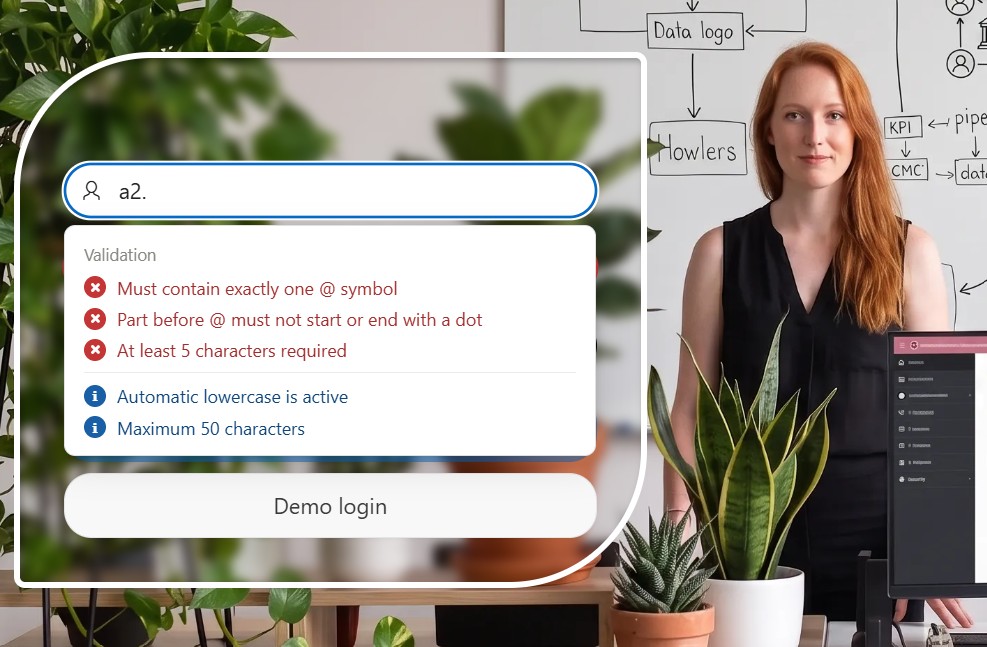
What the Plug-in Does
The core idea is subtractive feedback. Most validators show a static checklist of every rule with green and red icons next to it, which means the user is staring at a wall of text from the first keystroke. This one goes the other way: it lists only what is still wrong. As the address gets better, the box gets shorter — and the moment every active rule passes, the whole list collapses into a single green line.
<body> so no region with overflow:hidden can clip it@, text before and after it, a required top-level domain, no spaces or control charactersmailinator.comEverything is off by default. An item with no configuration behaves like a plain text field, so you enable exactly the rules your form needs and nothing more.
Grab item_type_plugin_email_validator.sql from the repository. It is a component export containing the render procedure and both asset files, so there is nothing else to upload.
If you prefer the command line, the same file runs through SQLcl or SQL*Plus when you are connected as the application's parsing schema.
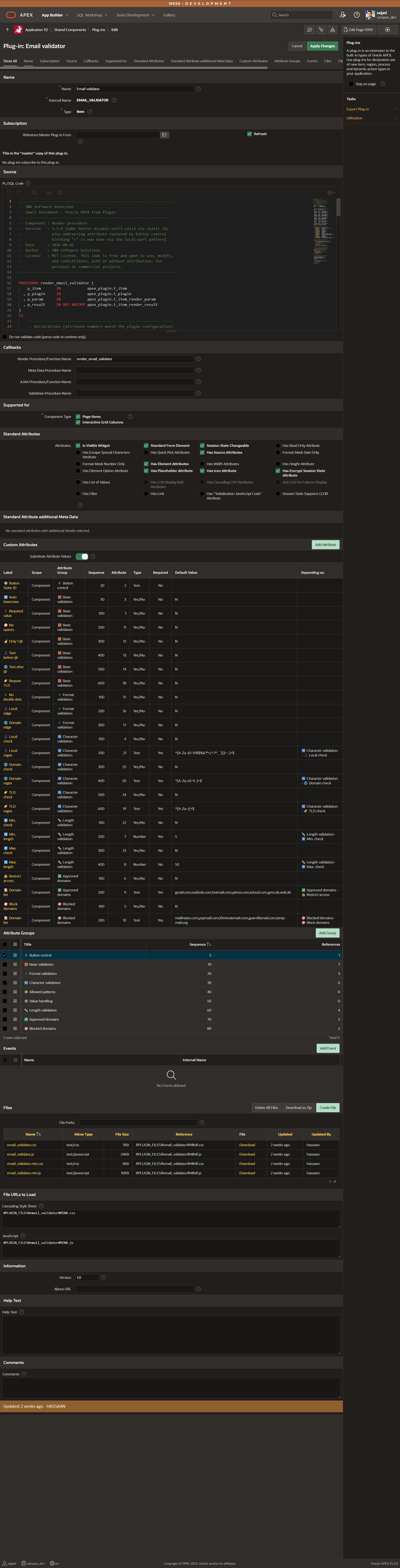
Page Designer shows the attributes in seven groups. Each group is a category of rule, and inside a group the pattern is always the same: a Yes/No switch turns the rule on, and any value the rule needs only appears once that switch is enabled.
| Group | What it covers |
|---|---|
| ⚡ Button control | The Static ID of a button that stays locked while the field is invalid |
| 🧱 Basic validation | Required value, auto lowercase, no spaces, exactly one @, text before and after it, required TLD |
| 🔹 Format validation | No double dots, no dot at the edge of the local part, no dot or hyphen at the edge of the domain |
| 🔤 Character validation | Separate regular expressions for the local part, the domain and the TLD |
| 📏 Length validation | Minimum and maximum length of the complete address |
| ✅ Approved domains | Only accept addresses from a comma-separated list of domains |
| 🚫 Blocked domains | Reject addresses from a comma-separated list — disposable providers by default |
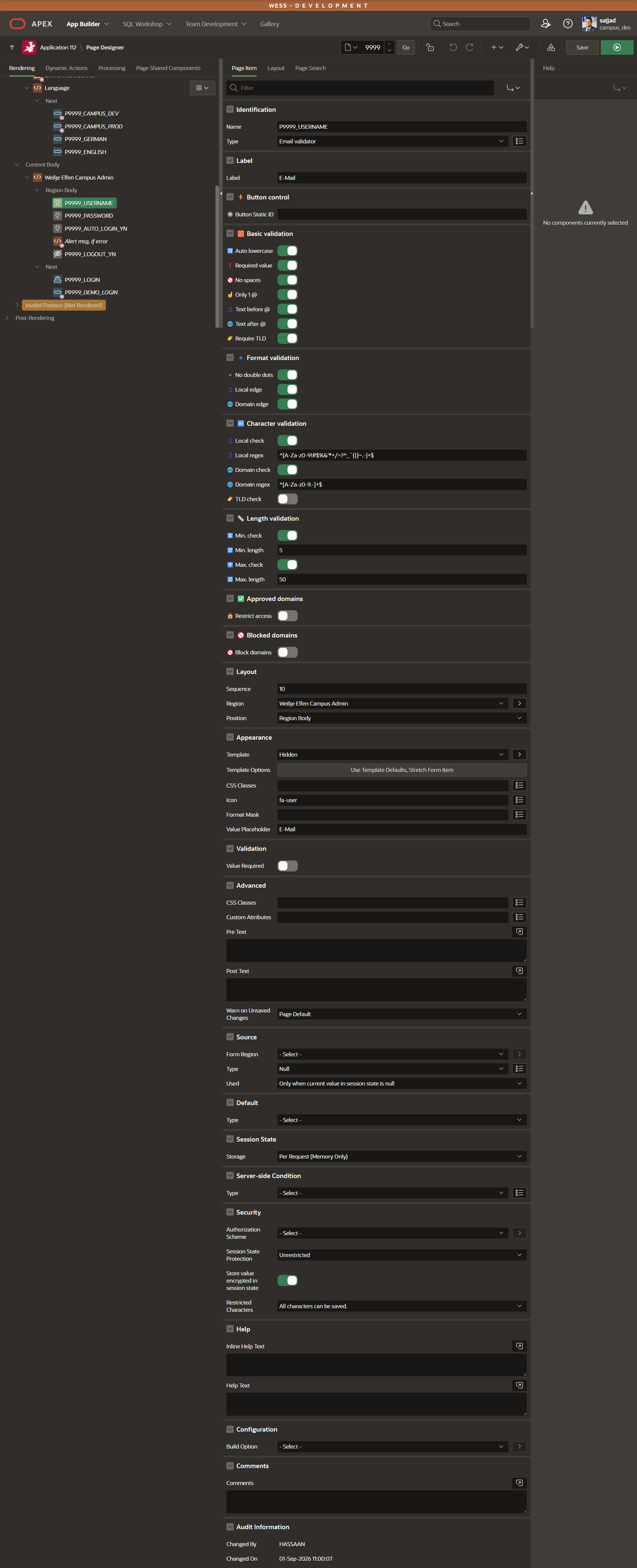
Three configurations that cover most forms
Rather than listing all 25 attributes here, these are the three setups I actually reach for. The full attribute reference with defaults and examples is in the README on GitHub.
# 1 — Minimal: just make sure it looks like an email address
Required value:   Yes
Only 1 @:         Yes
Text before @:    Yes
Text after @:     Yes
Require TLD:      Yes

# 2 — Public sign-up: clean input, no throwaway addresses
Required value:   Yes
Auto lowercase:   Yes
No spaces:        Yes
Only 1 @:         Yes
No double dots:   Yes
Local edge:       Yes
Domain edge:      Yes
Require TLD:      Yes
Block domains:    Yes   Domain list: mailinator.com, yopmail.com, 10minutemail.com
Min. check:       Yes   Min. length: 6
Max. check:       Yes   Max. length: 100

# 3 — Internal application: company and partner domains only
Required value:   Yes
Restrict access:  Yes   Domain list: company.com, partner.org
Only 1 @:         Yes
Require TLD:      Yes
Button Static ID: NEXT_BTN
A note on plus-addressing
The default pattern for the local part is the standard permitted character set, and it includes the plus sign — so max+newsletter@example.com passes. That is deliberate: those addresses are valid, and plenty of people use them to tag their inbox. If your downstream system cannot cope with them, enable Local check and remove the + from the pattern:
^[A-Za-z0-9._-]+$This is the attribute I use most. Give the button a Static ID in Page Designer — say NEXT_BTN — put the same value into the plug-in's Button Static ID attribute, and the button is blocked for as long as the address fails a rule. Hovering it shows a small hint underneath: "Please enter a valid email address first."
Three details in the implementation are worth calling out, because they are the kind of thing that breaks a naive version of this feature:
disabled property. Browsers suppress mouse events on disabled elements, so a genuinely disabled button never fires the mouseenter the hint depends on. The plug-in uses a CSS class plus aria-disabled instead, and swallows the click in the capture phase so the button's own apex.submit never runs.IntersectionObserver re-runs the validation the moment the field actually appears.window collects the messages instead of overwriting the button's title, and the hint boxes stack underneath each other. So an email field and a password field can both guard the same submit button.// Several S&H validators can guard the same button: each one
// registers its own message under its item name instead of
// overwriting the button's title attribute.
window.shRegisterBtnBlocker = function (pButtonId, pKey, pMessage) {
if (!pButtonId) { return; }
var reg = window.shBtnRegistry;
reg[pButtonId] = reg[pButtonId] || {};
if (pMessage) {
reg[pButtonId][pKey] = pMessage;
} else {
delete reg[pButtonId][pKey];
}
var button = document.getElementById(pButtonId);
if (!button) { return; }
var messages = Object.keys(reg[pButtonId]).map(function (k) {
return reg[pButtonId][k];
});
if (messages.length > 0) {
button.setAttribute("title", messages.join(" · "));
} else {
button.removeAttribute("title");
}
};Client-Side Is Comfort, Server-Side Is Truth
This applies to every JavaScript validation, not just this plug-in. Everything the browser does can be bypassed: JavaScript can be disabled, the DOM can be edited, and a request can be replayed with any payload at all. So whatever rules matter to your data, mirror the important ones in an APEX validation of type PL/SQL Function Body (returning Boolean):
DECLARE
    l_email    VARCHAR2(4000) := LOWER(TRIM(:P1_EMAIL));
    l_domain   VARCHAR2(4000);
    l_blocked  apex_t_varchar2 := apex_string.split(
                   'mailinator.com,yopmail.com,10minutemail.com', ',');
BEGIN
    -- Structure: exactly one @, text on both sides, a real TLD
    IF NOT REGEXP_LIKE(l_email, '^[^@[:space:]]+@[^@[:space:]]+\.[A-Za-z]{2,}$') THEN
        RETURN FALSE;
    END IF;

    -- Length of the complete address
    IF LENGTH(l_email) NOT BETWEEN 6 AND 100 THEN
        RETURN FALSE;
    END IF;

    -- Blocked (disposable) domains
    l_domain := SUBSTR(l_email, INSTR(l_email, '@') + 1);

    FOR i IN 1 .. l_blocked.COUNT LOOP
        IF l_domain = TRIM(l_blocked(i)) THEN
            RETURN FALSE;
        END IF;
    END LOOP;

    RETURN TRUE;
END;
The plug-in keeps the user from ever reaching that validation by accident. The validation keeps everyone else out.
How It Is Built
The architecture is deliberately boring, and that is the point — it makes the plug-in easy to read and easy to fork.
The render procedure writes a wrapper <span> whose data-* attributes carry the entire configuration, then the input, then an empty popover skeleton. It never renders any rule text, because the messages are bilingual and the language is only known in the browser:
sys.htp.p (
    '<span class="sh-eml-wrapper" id="' || v_element_id || '_SH_EMAIL"'
    || ' data-require="'        || v_require_value  || '"'
    || ' data-single-at="'      || v_single_at      || '"'
    || ' data-require-tld="'    || v_require_tld    || '"'
    || ' data-min-check="'      || v_min_check      || '"'
    || ' data-min-length="'     || NVL(v_min_length, '') || '"'
    || ' data-domain-whitelist="'
    || apex_escape.html_attribute(NVL(v_domain_whitelist, '')) || '">'
);

apex_javascript.add_onload_code (
    p_code => 'shEmailValidator.init("' || v_element_id || '");'
);
On the client each rule is a small object with three keys — whether it is active, the message to show, and the test itself. Adding a rule means adding one entry to the array; nothing else in the file has to change:
{
  active:  cfg.singleAt,
  message: txt("Muss genau ein @-Zeichen enthalten",
               "Must contain exactly one @ symbol"),
  test: function (v) {
    if (v.trim().length === 0) { return true; }
    return (v.match(/@/g) || []).length === 1;
  }
},
On every keystroke the active rules are filtered down to the failing ones, and only those are rendered. Two more things fall out of this design almost for free: the popover is moved to <body> on initialization, so no parent region can clip it or cover it, and user-supplied regular expressions are executed inside a try/catch — a typo in an attribute logs a console warning instead of throwing an error on every keystroke.
data-* attributes, never what the user typed — exactly like a native APEX item..sql export, the render procedure in readable form, the source and minified assets, and a full attribute reference in the README.Final Thoughts
The interesting part of building this was not the regular expressions — those are a solved problem. It was the small behaviours around them: not showing the user a wall of rules they have already satisfied, keeping the popover out of the way of overflow:hidden, and making sure a field hidden inside an unopened dialog never locks a button on the visible part of the page. Those are the details that decide whether a plug-in feels finished or merely functional.
A word of thanks to Hassaan Ahmed Tahir, who contributed to this plug-in and to its sibling, the Password Validator. Both of them share the button registry described above, so an email field and a password field can guard the same submit button without fighting over its tooltip.
If you find a bug or have an idea for a rule that is missing, open an issue on GitHub — I read all of them.
{fullWidth}