
Oracle Wallet in Docker — One Script That Makes HTTPS Calls From Oracle APEX and PL/SQL Just Work
A free, MIT-licensed bash script that fetches the live certificate chain, completes it up to the root CA and builds an auto-login wallet inside your Oracle container — so ORA-29024, ORA-24247 and ORA-28759 stop being your evening plans.
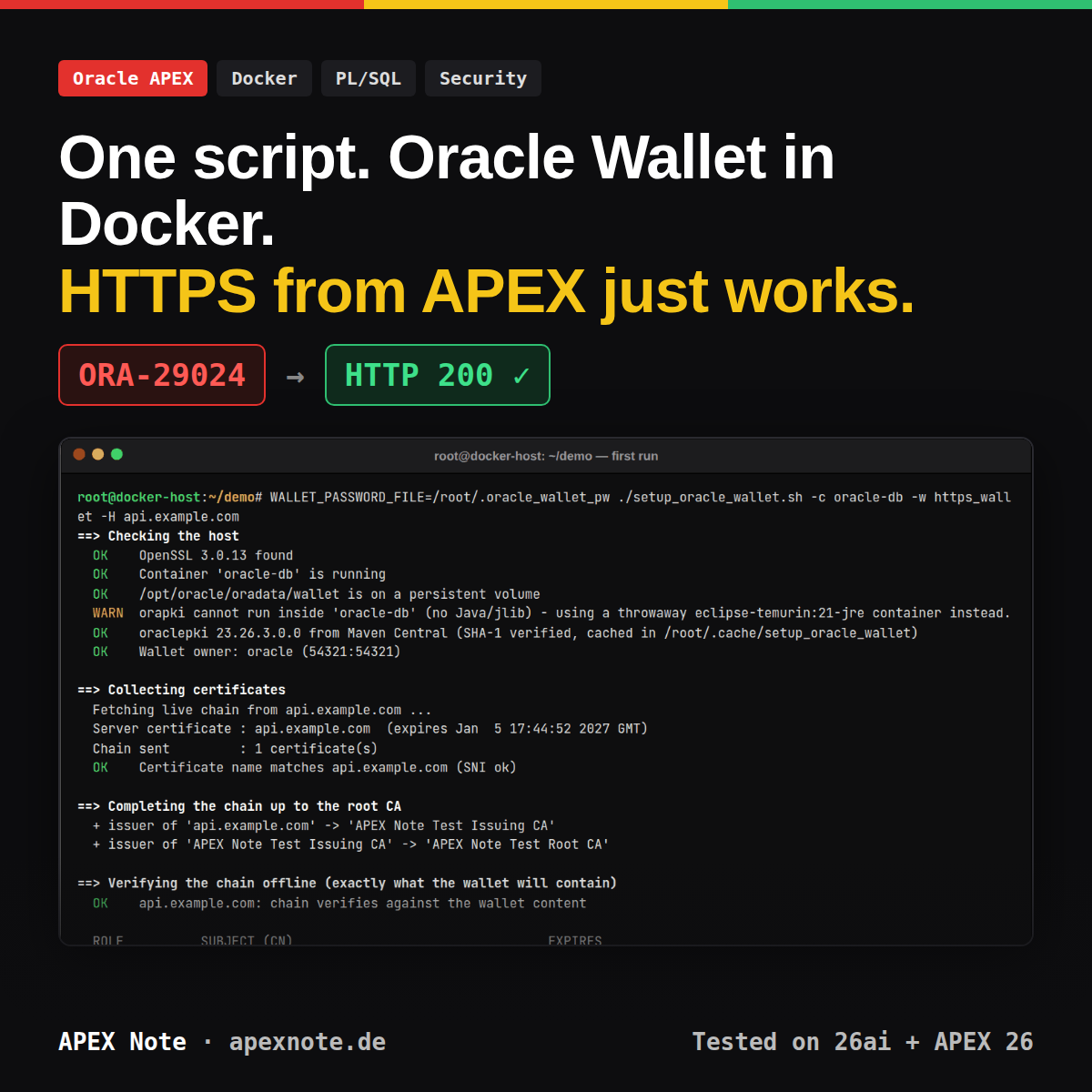
You call an HTTPS endpoint from Oracle APEX — a payment provider, a WebDAV drive, your own n8n webhook — and the database answers with ORA-29273: HTTP request failed. Two lines further down the stack sits the real reason: ORA-29024: Certificate validation failure. Your browser opens the same URL without complaint, curl on the host is happy, and the database still says no.

UTL_HTTP.REQUEST from SQL*Plus inside the gvenzl/oracle-free:23 container — ORA-29273, and two lines further down the real reason, ORA-29024.The reason is simple once you know it: Oracle does not use the operating system's trust store. UTL_HTTP and APEX_WEB_SERVICE trust exactly the certificates inside an Oracle wallet — and when the database runs in a Docker container, nobody creates that wallet for you. Fix it, and the next wall is ORA-24247 from the network ACL. Fix that, and the wallet you built as root answers with ORA-28759: failure to open file.
I have built these wallets by hand on every Oracle container I have touched: a dozen orapki commands, .crt files copied around with docker cp, and at least once a chmod -R 777 at eleven in the evening because "it works now". This post replaces all of that with one script you run on the Docker host, plus the SQL that goes with it. It is the reference I wanted for myself — every line of code is in this post, and every error message below was reproduced on a real container, not copied from a forum thread.
Who it is for: anyone running Oracle Database and APEX in Docker or Podman who needs outbound HTTPS. What you have at the end: a wallet on a persistent volume, the network ACL, a tested UTL_HTTP and APEX_WEB_SERVICE call, and a cron job that keeps the certificates current.
setup_oracle_wallet.sh (Step 3) and wallet_acl_test.sql (Steps 4–7). Originally developed by S&H Software Solutions – first published on APEX Note (October 2026).Why the Database Says No — Four Gates Between APEX and the API
Every HTTPS call from PL/SQL passes four checks, always in the same order. Each one fails with its own error number, and knowing which gate you are stuck at is worth more than any amount of trial and error:
| # | Gate | What Oracle checks | Error when it fails | Fixed by |
|---|---|---|---|---|
| 1 | Network ACL | Is this schema allowed to open a connection to host:443? | ORA-24247 | Step 04 (SQL) |
| 2 | Wallet | Can the server process (user oracle) open the wallet files? | ORA-28759 | Step 03 (script) |
| 3 | Certificate chain | Does the server's chain end at a CA certificate in the wallet? | ORA-29024 | Step 03 (script) |
| 4 | Host name | Does the certificate match the host in the URL? | ORA-24263 | Calling the right name |
By default UTL_HTTP wraps every one of them in ORA-29273: HTTP request failed, which is why the first error you read is always the least useful one. One call — UTL_HTTP.SET_DETAILED_EXCP_SUPPORT(TRUE) — changes that, and every test block in this post uses it.
What the Script Does
The rule I set myself: the script runs on the host, knows nothing about your application, and can be re-run every night without changing anything that is already correct.
- Fetches the live chain from one or more hosts with
openssl s_client -showcerts -servername— with SNI, so a shared server returns the certificate you will actually get - Completes incomplete chains — servers almost never send their root CA, and some forget the intermediate. The script finds the missing issuers in the host trust store or downloads them from the certificate's AIA URL
- Verifies before it touches anything —
openssl verifyagainst exactly the certificates that will end up in the wallet, with the host trust store switched off - Imports roots and intermediates, not the server certificate — so the wallet survives every 90-day Let's Encrypt renewal
- Also takes files and URLs —
.crt,.pem,.der,.p7b, for private CAs and TLS-inspecting company proxies - Idempotent — creates the auto-login wallet once, skips certificates that are already there (
PKI-04003), and backs up the old wallet before--recreate - Works on images without Java — community images ship
orapkibut no JDK; the script then uses a throwaway JRE container with Oracle's ownoraclepki.jarfrom Maven Central - Least privilege —
oracle:oinstall, folder750, files600, and it refuses to finish if the result is anything else - Never puts the password on a command line — environment variable, password file, prompt, or no password at all with
--sso-only - Warns early — when the wallet path is not on a volume, when the certificate name does not match the host, and when a certificate expires within 14 days
gvenzl/oracle-free:23 and :23-slim), Oracle APEX 26.2, Docker 29, OpenSSL 3.0 and bash 5 — against a test CA whose server sends only its own certificate, a host-name mismatch, a wrong password, wrong file ownership and a TLS-inspecting egress proxy. The orapki commands and the PL/SQL APIs used here exist in 19c and 21c as well; on those versions the script uses the orapki of the database home when it can run. All screenshots in this post come from a fresh re-run on 7 October 2026 (same versions, plus ORDS 26.3 for the APEX pages).Step-by-Step: From Container to First HTTPS Call
Know Your Container and Its Volume
The wallet has to live inside the container, because that is where the database server process opens it. And it has to live on a volume, because everything else in a container is gone after the next docker compose pull && docker compose up -d. Two commands tell you the container name and where its volume is mounted:
docker ps --format 'table {{.Names}}\t{{.Image}}\t{{.Status}}'

docker inspect -f '{{range .Mounts}}{{.Source}} -> {{.Destination}}{{println}}{{end}}' oracle-db
On the official images from container-registry.oracle.com and on the popular gvenzl/oracle-free images, the data volume is mounted at /opt/oracle/oradata. That is why the script's default wallet location is /opt/oracle/oradata/wallet/<name> — next to the data files, on the volume, and still there after the container has been re-created. While testing I also ran into two things about the images themselves that you should know before you start:
| Image | orapki usable inside? | APEX installable? |
|---|---|---|
container-registry.oracle.com/database/free, …/enterprise | Full Oracle home — the script uses it directly | Yes |
gvenzl/oracle-free:23 (tested) | No — the orapki script is there, but no JDK and no jlib. The script falls back to a JRE container | Yes (tested, APEX 26.2) |
gvenzl/oracle-free:23-slim (tested) | No — and no openssl either, which is why the chain is fetched on the host | No — XDB is removed, apexins.sql stops at the prerequisite check |
Dry Run — See the Chain Before You Import It
Put setup_oracle_wallet.sh on the Docker host — not into the container — and start with check mode. It fetches, completes and verifies the chain, prints what it would import, and does not touch the container at all. That makes it the first thing I run whenever an integration breaks:
chmod 750 setup_oracle_wallet.sh
./setup_oracle_wallet.sh -n -H api.example.com -H webdav.hidrive.strato.com
Below is a real run against my test server. I configured it on purpose like a surprising number of production servers: it sends only its own certificate — no intermediate, no root:
==> Checking the host
  OK    OpenSSL 3.0.13 found

==> Collecting certificates
  Fetching live chain from api.example.com ...
  Server certificate : api.example.com  (expires Jan  5 17:44:52 2027 GMT)
  Chain sent         : 1 certificate(s)
  OK    Certificate name matches api.example.com (SNI ok)

==> Completing the chain up to the root CA
  + issuer of 'api.example.com' -> 'APEX Note Test Issuing CA'
  + issuer of 'APEX Note Test Issuing CA' -> 'APEX Note Test Root CA'

==> Verifying the chain offline (exactly what the wallet will contain)
  OK    api.example.com: chain verifies against the wallet content

  ROLE          SUBJECT (CN)                                 EXPIRES
  root          APEX Note Test Root CA                       Oct  3 23:20:55 2036 GMT
  intermediate  APEX Note Test Issuing CA                    Oct  5 23:20:55 2031 GMT
  leaf (skip)   api.example.com                              Jan  5 17:44:52 2027 GMT

==> Check mode: nothing was changed.
The two + issuer of lines are the interesting part. The server delivered one certificate; the script followed the Authority Information Access URL inside it to download the intermediate, then did the same again for the root, and only then ran openssl verify — against nothing but those two certificates. A browser does that AIA dance silently. Oracle does not, and I proved it with this very server: a wallet containing only the root still failed with ORA-29024, because the intermediate was missing.
Build the Wallet
First the password. An auto-login wallet still has a password — it protects ewallet.p12, the file you edit with orapki — but the database never needs it. The script never accepts it as an argument, because arguments end up in ps output and shell history. It looks in this order:
| Source | Use it for |
|---|---|
WALLET_PASSWORD environment variable | CI pipelines with a secret store |
WALLET_PASSWORD_FILE — a file with mode 600 | Cron jobs and repeatable runs (my default) |
| Interactive prompt | The first run in a terminal — asks twice for a new wallet |
--sso-only | No password at all — cwallet.sso only (see "How it works inside") |
PKI-01002: Invalid password. Passwords must have a minimum length of sixteen characters…. The script checks the stricter rule up front, so you find out before anything is created.# once: a random password in a file only root can read
install -m 600 /dev/null /root/.oracle_wallet_pw
openssl rand -base64 24 > /root/.oracle_wallet_pw
WALLET_PASSWORD_FILE=/root/.oracle_wallet_pw \
./setup_oracle_wallet.sh -c oracle-db -w https_wallet \
-H api.example.com -H webdav.hidrive.strato.comHere is the complete script. It is long because it handles the cases that cost me evenings — not because the happy path is complicated. The host part collects and verifies the certificates; everything between <<'INNER' and INNER runs inside the container. The quotes around 'INNER' matter: they stop the host shell from expanding a single $ in that block, so the inner script sees exactly what is written here.
#!/usr/bin/env bash
# =============================================================================
#  setup_oracle_wallet.sh
#  Create or update an Oracle wallet INSIDE a Docker container so that
#  UTL_HTTP and APEX_WEB_SERVICE can call HTTPS endpoints (fixes ORA-29024).
#
#  Runs on the Docker HOST. Fetches the live certificate chain of one or more
#  target hosts (and/or takes .crt files / URLs), completes the chain up to the
#  root CA, verifies it with openssl, and imports root + intermediates into an
#  auto-login wallet with orapki inside the container. Safe to re-run.
#
#  Originally developed by S&H Software Solutions (Sajjad Hanifa)
#  First published on APEX Note - https://www.apexnote.de - October 2026
#  License: MIT - complete code in the blog post on www.apexnote.de
# =============================================================================
set -Eeuo pipefail

readonly VERSION="1.0.0"

# ---------------------------------------------------------------- defaults ---
# Every default can be overridden by an environment variable or an argument.
CONTAINER="${ORA_CONTAINER:-oracle-db}"
WALLET_NAME="${WALLET_NAME:-https_wallet}"
WALLET_BASE="${WALLET_BASE:-/opt/oracle/oradata/wallet}"
WALLET_OWNER="${WALLET_OWNER:-oracle:oinstall}"
PROXY="${WALLET_PROXY:-}"            # host:port, only for fetching the chain
TOOL_IMAGE="${WALLET_TOOL_IMAGE:-}"  # helper image when the DB image cannot run orapki
JRE_IMAGE="${WALLET_JRE_IMAGE:-eclipse-temurin:21-jre}"
PKI_JAR_VERSION="${ORAPKI_JAR_VERSION:-23.26.3.0.0}"
PKI_MAVEN="${ORAPKI_MAVEN:-https://repo1.maven.org/maven2/com/oracle/database/security}"
PKI_CACHE="${ORAPKI_CACHE:-${XDG_CACHE_HOME:-$HOME/.cache}/setup_oracle_wallet}"
CONNECT_TIMEOUT="${CONNECT_TIMEOUT:-15}"

HOSTS=()          # -H  host[:port]  (repeatable)
CERT_FILES=()     # -f  local .crt/.pem/.cer/.der/.p7b on the host (repeatable)
CERT_URLS=()      # -u  URL of a certificate file (repeatable)
RECREATE=0        # -r  back up and rebuild the wallet from scratch
SSO_ONLY=0        # -s  password-less wallet (cwallet.sso only)
INCLUDE_LEAF=0    # -l  also import the server (leaf) certificates
CHECK_ONLY=0      # -n  fetch + verify only, do not touch the container

# ---------------------------------------------------------------- logging ----
if [[ -t 1 ]]; then
  C_R=$'\e[31m'; C_Y=$'\e[33m'; C_G=$'\e[32m'; C_B=$'\e[1m'; C_0=$'\e[0m'
else
  C_R=""; C_Y=""; C_G=""; C_B=""; C_0=""
fi
info() { printf '%s\n' "  $*"; }
ok()   { printf '%s\n' "${C_G}  OK${C_0}    $*"; }
warn() { printf '%s\n' "${C_Y}  WARN${C_0}  $*" >&2; }
die()  { printf '%s\n' "${C_R}  ERROR${C_0} $*" >&2; exit 1; }
step() { printf '\n%s\n' "${C_B}==> $*${C_0}"; }

usage() {
  cat <<'USAGE'
Usage: setup_oracle_wallet.sh [options] -H host[:port] [-H ...] [-f file] [-u url]

Builds an auto-login Oracle wallet inside a running Docker container and
imports the CA certificates (root + intermediates) needed to call HTTPS hosts
from UTL_HTTP / APEX_WEB_SERVICE.

Certificate sources (at least one, can be combined and repeated):
  -H, --host HOST[:PORT]   fetch the live chain from HOST (default port 443)
  -f, --cert-file FILE     import a certificate/bundle file from the host
  -u, --cert-url URL       download a certificate/bundle and import it

Options:
  -c, --container NAME     Docker container             (default: oracle-db)
  -w, --wallet NAME        wallet folder name           (default: https_wallet)
  -b, --base PATH          wallet base path in container
                           (default: /opt/oracle/oradata/wallet)
  -o, --owner USER:GROUP   owner of the wallet files    (default: oracle:oinstall)
  -p, --proxy HOST:PORT    HTTP proxy for fetching the chain (openssl -proxy)
  -T, --tool-image IMAGE   run orapki in a throwaway container of IMAGE that
                           shares the volumes of the DB container. Used
                           automatically (eclipse-temurin:21-jre + oraclepki.jar
                           from Maven Central) when the DB image has no Java,
                           e.g. gvenzl/oracle-free or gvenzl/oracle-xe
  -s, --sso-only           password-less wallet (orapki -auto_login_only)
  -l, --include-leaf       also import the server certificates (not recommended)
  -r, --recreate           back up the existing wallet and build a new one
  -n, --check              fetch and verify the chain only, change nothing
  -h, --help               show this help
  -V, --version            show the version

Wallet password (not needed with --sso-only), first match wins:
  WALLET_PASSWORD          environment variable
  WALLET_PASSWORD_FILE     file containing the password (chmod 600)
  interactive prompt       when running in a terminal

Examples:
  ./setup_oracle_wallet.sh -c oracle-db -H api.example.com
  WALLET_PASSWORD_FILE=/root/.oracle_wallet_pw ./setup_oracle_wallet.sh \
      -c oracle-db -w https_wallet -H api.example.com -H webdav.hidrive.strato.com
  ./setup_oracle_wallet.sh -c oracle-db -s -f ./corporate-root-ca.crt
  ./setup_oracle_wallet.sh -n -H api.example.com      # dry run
  ./setup_oracle_wallet.sh -c oracle-db -T container-registry.oracle.com/database/free -H api.example.com
USAGE
}

# ---------------------------------------------------------------- arguments --
need_arg() { [[ $# -ge 2 && -n "$2" && "$2" != -* ]] || die "Option $1 needs a value."; }

while [[ $# -gt 0 ]]; do
  case "$1" in
    -H|--host)         need_arg "$@"; HOSTS+=("$2"); shift 2 ;;
    -f|--cert-file)    need_arg "$@"; CERT_FILES+=("$2"); shift 2 ;;
    -u|--cert-url)     need_arg "$@"; CERT_URLS+=("$2"); shift 2 ;;
    -c|--container)    need_arg "$@"; CONTAINER="$2"; shift 2 ;;
    -w|--wallet)       need_arg "$@"; WALLET_NAME="$2"; shift 2 ;;
    -b|--base)         need_arg "$@"; WALLET_BASE="${2%/}"; shift 2 ;;
    -o|--owner)        need_arg "$@"; WALLET_OWNER="$2"; shift 2 ;;
    -p|--proxy)        need_arg "$@"; PROXY="$2"; shift 2 ;;
    -T|--tool-image)   need_arg "$@"; TOOL_IMAGE="$2"; shift 2 ;;
    -s|--sso-only)     SSO_ONLY=1; shift ;;
    -l|--include-leaf) INCLUDE_LEAF=1; shift ;;
    -r|--recreate)     RECREATE=1; shift ;;
    -n|--check)        CHECK_ONLY=1; shift ;;
    -h|--help)         usage; exit 0 ;;
    -V|--version)      echo "setup_oracle_wallet.sh ${VERSION}"; exit 0 ;;
    *)                 usage >&2; die "Unknown argument: $1" ;;
  esac
done

(( ${#HOSTS[@]} + ${#CERT_FILES[@]} + ${#CERT_URLS[@]} > 0 )) \
  || { usage >&2; die "Give at least one -H host, -f file or -u url."; }

# Only harmless characters: the values end up in paths inside the container.
[[ "$WALLET_NAME" =~ ^[A-Za-z0-9._-]+$ && "$WALLET_NAME" != *..* ]] \
  || die "Invalid wallet name '$WALLET_NAME' (allowed: A-Z a-z 0-9 . _ -)."
[[ "$WALLET_BASE" =~ ^/[A-Za-z0-9/._-]+$ && "$WALLET_BASE" != *..* ]] \
  || die "Invalid base path '$WALLET_BASE' (absolute path, no '..')."
[[ "$WALLET_OWNER" =~ ^[a-z_][a-z0-9_-]*:[a-z_][a-z0-9_-]*$ ]] \
  || die "Invalid owner '$WALLET_OWNER' (expected user:group)."
[[ "$CONNECT_TIMEOUT" =~ ^[0-9]+$ ]] || die "CONNECT_TIMEOUT must be a number."
WALLET_PATH="${WALLET_BASE}/${WALLET_NAME}"

# ---------------------------------------------------------------- workspace --
WORK="$(mktemp -d "${TMPDIR:-/tmp}/owallet.XXXXXX")"
chmod 700 "$WORK"
mkdir -p "$WORK/set" "$WORK/leaf" "$WORK/import"
cleanup() { rm -rf "$WORK"; unset WALLET_PASSWORD; }
trap cleanup EXIT
trap 'die "Aborted in line $LINENO."' ERR

# ---------------------------------------------------------------- checks -----
step "Checking the host"
for cmd in openssl awk sed; do
  command -v "$cmd" >/dev/null 2>&1 || die "'$cmd' is not installed on the host."
done
if (( ${#CERT_URLS[@]} > 0 )) && ! command -v curl >/dev/null 2>&1; then
  die "'curl' is required for -u."
fi
TIMEOUT_CMD=()
command -v timeout >/dev/null 2>&1 && TIMEOUT_CMD=(timeout "$CONNECT_TIMEOUT")

# openssl verify must not silently fall back to the host trust store.
NO_STORE=(-no-CApath)
openssl version | grep -q '^OpenSSL [3-9]' && NO_STORE+=(-no-CAstore)
ok "$(openssl version | awk '{print $1, $2}') found"

if (( ! CHECK_ONLY )); then
  command -v docker >/dev/null 2>&1 || die "'docker' is not installed on the host."
  docker info >/dev/null 2>&1 || die "Cannot talk to the Docker daemon (are you root / in the docker group?)."
  [[ "$(docker inspect -f '{{.State.Running}}' "$CONTAINER" 2>/dev/null || true)" == "true" ]] \
    || die "Container '$CONTAINER' does not exist or is not running (docker ps)."
  ok "Container '$CONTAINER' is running"

  # The wallet must live on a volume, or it dies with the next 'docker run'.
  on_volume=0
  while IFS= read -r mnt; do
    [[ -n "$mnt" ]] || continue
    if [[ "$WALLET_BASE" == "$mnt" || "$WALLET_BASE" == "${mnt%/}/"* ]]; then on_volume=1; fi
  done < <(docker inspect -f '{{range .Mounts}}{{println .Destination}}{{end}}' "$CONTAINER")
  if (( on_volume )); then
    ok "$WALLET_BASE is on a persistent volume"
  else
    warn "$WALLET_BASE is NOT on a mounted volume - the wallet is lost when the container is re-created."
  fi

  # orapki is a Java tool. Community images (gvenzl/oracle-free, gvenzl/oracle-xe)
  # ship the orapki script but neither a JDK nor $ORACLE_HOME/jlib.
  # shellcheck disable=SC2016  # expanded inside the container, not here
  PKI_PROBE='j="${JAVA_HOME:-/nonexistent}/bin/java"; [ -x "${ORACLE_HOME:-/x}/jdk/bin/java" ] && j="$ORACLE_HOME/jdk/bin/java"; [ -x "$j" ] && [ -f "${ORACLE_HOME:-/x}/jlib/oraclepki.jar" ]'
  USE_JAR=0
  if [[ -z "$TOOL_IMAGE" ]] && docker exec "$CONTAINER" sh -c "$PKI_PROBE"; then
    ok "orapki is usable inside the container"
  else
    if [[ -z "$TOOL_IMAGE" ]]; then
      TOOL_IMAGE="$JRE_IMAGE"
      warn "orapki cannot run inside '$CONTAINER' (no Java/jlib) - using a throwaway $TOOL_IMAGE container instead."
    fi
    (( on_volume )) || die "A tool container needs $WALLET_BASE on a volume (shared via --volumes-from)."
    docker image inspect "$TOOL_IMAGE" >/dev/null 2>&1 \
      || { info "Pulling $TOOL_IMAGE ..."; docker pull -q "$TOOL_IMAGE" >/dev/null || die "Cannot pull $TOOL_IMAGE."; }
    if docker run --rm --network none --entrypoint sh "$TOOL_IMAGE" -c "$PKI_PROBE"; then
      ok "orapki is usable in $TOOL_IMAGE"
    elif docker run --rm --network none --entrypoint sh "$TOOL_IMAGE" -c 'command -v java >/dev/null'; then
      USE_JAR=1
    else
      die "'$TOOL_IMAGE' has neither a usable orapki nor java."
    fi
  fi

  if (( USE_JAR )); then
    # Oracle publishes the orapki classes on Maven Central - no DB home needed.
    # Cached on the host, so cron runs neither depend on nor hammer Maven.
    command -v curl >/dev/null 2>&1 || die "'curl' is required to download oraclepki.jar."
    mkdir -p "$PKI_CACHE" "$WORK/import/jars"
    arts=(oraclepki)                                  # 23.x+: one self-contained jar
    [[ "${PKI_JAR_VERSION%%.*}" =~ ^[0-9]+$ && "${PKI_JAR_VERSION%%.*}" -lt 23 ]] \
      && arts+=(osdt_core osdt_cert)                  # 19c/21c need the osdt jars too
    for art in "${arts[@]}"; do
      file="$art-$PKI_JAR_VERSION.jar"
      url="$PKI_MAVEN/$art/$PKI_JAR_VERSION/$file"
      if [[ ! -s "$PKI_CACHE/$file" || ! -s "$PKI_CACHE/$file.sha1" ]]; then
        code="$(curl -sSL --retry 6 --retry-delay 2 --max-time 60 -w '%{http_code}' \
                 -o "$WORK/$file" "$url" 2>/dev/null || true)"
        [[ "$code" == "200" ]] || die "Cannot download $url (HTTP $code) - try again or set ORAPKI_MAVEN to a mirror."
        curl -fsSL --retry 6 --retry-delay 2 --max-time 30 "$url.sha1" -o "$WORK/$file.sha1" \
          || die "Cannot download $url.sha1"
        mv "$WORK/$file" "$PKI_CACHE/$file"; mv "$WORK/$file.sha1" "$PKI_CACHE/$file.sha1"
      fi
      want="$(cut -c1-40 "$PKI_CACHE/$file.sha1")"
      have="$( (sha1sum "$PKI_CACHE/$file" 2>/dev/null || shasum "$PKI_CACHE/$file") | cut -c1-40)"
      if [[ -z "$want" || "$want" != "$have" ]]; then
        rm -f "$PKI_CACHE/$file" "$PKI_CACHE/$file.sha1"
        die "Checksum mismatch for $file - cache cleared, please re-run."
      fi
      cp "$PKI_CACHE/$file" "$WORK/import/jars/$art.jar"
    done
    ok "oraclepki $PKI_JAR_VERSION from Maven Central (SHA-1 verified, cached in $PKI_CACHE)"
  fi

  # Resolve the owner to numeric ids of the DB container - correct even when
  # the files are written by a different (tool) container.
  OWNER_USER="${WALLET_OWNER%%:*}"; OWNER_GROUP="${WALLET_OWNER#*:}"
  OWNER_UID="$(docker exec "$CONTAINER" id -u "$OWNER_USER" 2>/dev/null)" \
    || die "User '$OWNER_USER' does not exist in '$CONTAINER'."
  OWNER_GID="$(docker exec "$CONTAINER" getent group "$OWNER_GROUP" 2>/dev/null | cut -d: -f3 || true)"
  if [[ -z "$OWNER_GID" ]]; then
    OWNER_GID="$(docker exec "$CONTAINER" id -g "$OWNER_USER")"
    warn "Group '$OWNER_GROUP' not found, using the primary group of '$OWNER_USER' ($OWNER_GID)."
  fi
  ok "Wallet owner: $OWNER_USER ($OWNER_UID:$OWNER_GID)"
fi

# ---------------------------------------------------------------- helpers ----
x509()      { openssl x509 -noout "$@" 2>/dev/null; }
cn_of()     { x509 -subject -nameopt multiline -in "$1" | awk -F' = ' '/commonName/{print $2; exit}'; }
fp_of()     { x509 -fingerprint -sha256 -in "$1" | cut -d= -f2 | tr -d ':'; }
is_self()   { [[ "$(x509 -subject_hash -in "$1")" == "$(x509 -issuer_hash -in "$1")" ]]; }
is_ca()     { x509 -text -in "$1" | grep -q 'CA:TRUE'; }
in_set()    { [[ -f "$WORK/set/$(fp_of "$1").pem" ]]; }

# Split any PEM bundle into one file per certificate: <prefix>01.pem, 02.pem...
split_pem() {
  awk -v p="$2" '
    /-----BEGIN CERTIFICATE-----/ { n++; f = sprintf("%s%02d.pem", p, n) }
    f { print > f }
    /-----END CERTIFICATE-----/   { close(f); f = "" }' "$1"
}

# Normalise PEM / DER / PKCS#7 into a PEM bundle on stdout.
to_pem() {
  if grep -q -- '-----BEGIN CERTIFICATE-----' "$1"; then cat "$1"
  elif openssl x509 -inform DER -in "$1" 2>/dev/null; then :
  elif openssl pkcs7 -inform DER -print_certs -in "$1" 2>/dev/null; then :
  elif openssl pkcs7 -inform PEM -print_certs -in "$1" 2>/dev/null; then :
  else return 1
  fi
}

# Put one certificate into the import set (CA) or the leaf set (server cert).
add_cert() { # $1 = single-cert PEM, $2 = source label
  local fp dst
  x509 -in "$1" >/dev/null || { warn "Skipping unreadable certificate from $2"; return 0; }
  fp="$(fp_of "$1")"
  if is_ca "$1" || is_self "$1" || (( INCLUDE_LEAF )); then
    dst="$WORK/set/$fp.pem"
  else
    dst="$WORK/leaf/$fp.pem"
  fi
  [[ -f "$dst" ]] || openssl x509 -in "$1" -out "$dst"
}

add_bundle() { # $1 = any certificate file, $2 = source label
  local tmp="$WORK/bundle.pem" part
  to_pem "$1" > "$tmp" || die "$2 is not a certificate (PEM, DER or PKCS#7). Is it an HTML login page?"
  rm -f "$WORK"/part-*.pem
  split_pem "$tmp" "$WORK/part-"
  for part in "$WORK"/part-*.pem; do
    [[ -e "$part" ]] || die "No certificate found in $2."
    add_cert "$part" "$2"
  done
}

# Find the issuer of a certificate: host trust store first, then AIA download.
find_issuer() { # $1 = cert, $2 = output file
  local ih dir cand url
  ih="$(x509 -issuer_hash -in "$1")"
  for dir in /etc/ssl/certs /etc/pki/tls/certs /usr/local/share/certs; do
    for cand in "$dir/$ih".[0-9]; do
      [[ -f "$cand" ]] || continue
      if [[ "$(x509 -subject_hash -in "$cand")" == "$ih" ]]; then
        openssl x509 -in "$cand" -out "$2" 2>/dev/null && return 0
      fi
    done
  done
  url="$(x509 -text -in "$1" | awk '/CA Issuers - URI:/{sub(/.*URI:/, ""); print; exit}')"
  if [[ -n "$url" ]] && command -v curl >/dev/null 2>&1; then
    if curl -fsSL --retry 3 --max-time "$CONNECT_TIMEOUT" "$url" -o "$WORK/aia.bin" 2>/dev/null \
       && to_pem "$WORK/aia.bin" > "$WORK/aia.pem" 2>/dev/null; then
      openssl x509 -in "$WORK/aia.pem" -out "$2" 2>/dev/null && return 0
    fi
  fi
  return 1
}

# Walk every chain upwards until each certificate ends at a self-signed root.
complete_chain() {
  local pass f new missing
  for pass in 1 2 3 4 5; do
    new=0
    for f in "$WORK"/set/*.pem "$WORK"/leaf/*.pem; do
      [[ -e "$f" ]] || continue
      is_self "$f" && continue
      # issuer already present?
      missing=1
      for c in "$WORK"/set/*.pem; do
        [[ -e "$c" ]] || continue
        if [[ "$(x509 -subject_hash -in "$c")" == "$(x509 -issuer_hash -in "$f")" ]]; then missing=0; break; fi
      done
      (( missing )) || continue
      if find_issuer "$f" "$WORK/issuer.pem" && ! in_set "$WORK/issuer.pem"; then
        info "+ issuer of '$(cn_of "$f")' -> '$(cn_of "$WORK/issuer.pem")'"
        cp "$WORK/issuer.pem" "$WORK/set/$(fp_of "$WORK/issuer.pem").pem"
        new=1
      fi
    done
    (( new )) || return 0
    : "$pass"
  done
}

fetch_chain() { # $1 = host[:port]
  local host="${1%%:*}" port=443 out args
  [[ "$1" == *:* ]] && port="${1##*:}"
  [[ "$host" =~ ^[A-Za-z0-9.-]+$ && "$port" =~ ^[0-9]+$ ]] || die "Invalid host '$1'."
  out="$WORK/chain-$host.txt"
  args=(s_client -showcerts -servername "$host" -connect "$host:$port")
  [[ -n "$PROXY" ]] && args+=(-proxy "$PROXY")
  "${TIMEOUT_CMD[@]}" openssl "${args[@]}" </dev/null >"$out" 2>"$WORK/err-$host.txt" || true
  grep -q -- '-----BEGIN CERTIFICATE-----' "$out" || {
    sed 's/^/        /' "$WORK/err-$host.txt" | tail -n 5 >&2
    die "No TLS certificate received from $host:$port (DNS, firewall or proxy? try -p host:port)."
  }
  rm -f "$WORK"/part-*.pem
  split_pem "$out" "$WORK/part-"
  local leaf="$WORK/part-01.pem"
  info "Server certificate : $(cn_of "$leaf")  (expires $(x509 -enddate -in "$leaf" | cut -d= -f2))"
  info "Chain sent         : $(find "$WORK" -maxdepth 1 -name 'part-*.pem' | wc -l | tr -d ' ') certificate(s)"
  if openssl x509 -noout -checkhost "$host" -in "$leaf" 2>/dev/null | grep -q 'does match'; then
    ok "Certificate name matches $host (SNI ok)"
  else
    warn "Certificate does NOT match '$host' - expect ORA-24263 unless you pass https_host."
  fi
  openssl x509 -checkend $((14 * 86400)) -noout -in "$leaf" >/dev/null 2>&1 \
    || warn "Server certificate of $host expires within 14 days."
  local part
  for part in "$WORK"/part-*.pem; do add_cert "$part" "$host"; done
  cp "$leaf" "$WORK/verify-$host.pem"
}

# ---------------------------------------------------------------- collect ----
step "Collecting certificates"
for h in "${HOSTS[@]+"${HOSTS[@]}"}"; do
  info "Fetching live chain from $h ..."
  fetch_chain "$h"
done
for f in "${CERT_FILES[@]+"${CERT_FILES[@]}"}"; do
  [[ -r "$f" ]] || die "Cannot read certificate file '$f'."
  info "Reading $f"
  add_bundle "$f" "$f"
done
for u in "${CERT_URLS[@]+"${CERT_URLS[@]}"}"; do
  info "Downloading $u"
  curl -fsSL --retry 3 --max-time "$CONNECT_TIMEOUT" "$u" -o "$WORK/download.bin" \
    || die "Download failed: $u"
  add_bundle "$WORK/download.bin" "$u"
done

step "Completing the chain up to the root CA"
complete_chain

# ---------------------------------------------------------------- verify -----
step "Verifying the chain offline (exactly what the wallet will contain)"
: > "$WORK/roots.pem"; : > "$WORK/inter.pem"
roots=0
for c in "$WORK"/set/*.pem; do
  [[ -e "$c" ]] || continue
  if is_self "$c"; then cat "$c" >> "$WORK/roots.pem"; roots=$((roots + 1))
  else cat "$c" >> "$WORK/inter.pem"; fi
done
(( roots > 0 )) || warn "No root CA found. Import it with -f root.crt or expect ORA-29024."

for v in "$WORK"/verify-*.pem; do
  [[ -e "$v" ]] || continue
  h="${v##*/verify-}"; h="${h%.pem}"
  vargs=("${NO_STORE[@]}" -CAfile "$WORK/roots.pem")
  [[ -s "$WORK/inter.pem" ]] && vargs+=(-untrusted "$WORK/inter.pem")
  if (( roots > 0 )) && openssl verify "${vargs[@]}" "$v" >/dev/null 2>&1; then
    ok "$h: chain verifies against the wallet content"
  else
    warn "$h: chain does NOT verify against the wallet content - ORA-29024 likely."
  fi
done

printf '\n  %-13s %-44s %s\n' "ROLE" "SUBJECT (CN)" "EXPIRES"
n=0
for want in root intermediate leaf; do          # roots first, then the rest
  for c in "$WORK"/set/*.pem; do
    [[ -e "$c" ]] || continue
    if is_self "$c"; then role="root"; elif is_ca "$c"; then role="intermediate"; else role="leaf"; fi
    [[ "$role" == "$want" ]] || continue
    cn="$(cn_of "$c")"; cn="${cn:-unknown}"
    printf '  %-13s %-44.44s %s\n' "$role" "$cn" "$(x509 -enddate -in "$c" | cut -d= -f2)"
    n=$((n + 1))
    safe="$(printf '%s' "$cn" | tr -c 'A-Za-z0-9._-' '_' | cut -c1-40)"
    cp "$c" "$WORK/import/$(printf '%02d' "$n")-${role}-${safe}.pem"
  done
done
for c in "$WORK"/leaf/*.pem; do
  [[ -e "$c" ]] || continue
  printf '  %-13s %-44.44s %s\n' "leaf (skip)" "$(cn_of "$c")" "$(x509 -enddate -in "$c" | cut -d= -f2)"
done
(( n > 0 )) || die "Nothing to import."

if (( CHECK_ONLY )); then
  step "Check mode: nothing was changed."
  exit 0
fi

# ---------------------------------------------------------------- password ---
state="$(docker exec "$CONTAINER" sh -c \
  "if [ -f '$WALLET_PATH/ewallet.p12' ]; then echo p12; elif [ -f '$WALLET_PATH/cwallet.sso' ]; then echo sso; else echo none; fi")"
if (( RECREATE )); then state="none"; fi
if [[ "$state" == "sso" && $SSO_ONLY -eq 0 ]]; then
  info "Existing wallet is password-less (cwallet.sso only) - switching to --sso-only."
  SSO_ONLY=1
fi
[[ "$state" == "p12" && $SSO_ONLY -eq 1 ]] \
  && die "Existing wallet has a password (ewallet.p12). Drop --sso-only or use --recreate."

if (( ! SSO_ONLY )); then
  if [[ -n "${WALLET_PASSWORD:-}" ]]; then
    :
  elif [[ -n "${WALLET_PASSWORD_FILE:-}" ]]; then
    [[ -r "$WALLET_PASSWORD_FILE" ]] || die "Cannot read WALLET_PASSWORD_FILE."
    WALLET_PASSWORD="$(head -n 1 "$WALLET_PASSWORD_FILE" | tr -d '\r')"
  elif [[ -t 0 ]]; then
    read -r -s -p "  Wallet password: " WALLET_PASSWORD; echo
    if [[ "$state" == "none" ]]; then
      read -r -s -p "  Repeat password: " pw2; echo
      [[ "$WALLET_PASSWORD" == "$pw2" ]] || die "Passwords do not match."
      unset pw2
    fi
  else
    die "No wallet password: set WALLET_PASSWORD or WALLET_PASSWORD_FILE, or use --sso-only."
  fi
  # orapki policy: 19c wants 8+ characters, 23ai/26ai orapki wants 16+, with
  # letters plus digits or special characters. We enforce the stricter rule.
  if [[ "$state" == "none" ]]; then
    [[ ${#WALLET_PASSWORD} -ge 16 && "$WALLET_PASSWORD" =~ [A-Za-z] && "$WALLET_PASSWORD" =~ [0-9[:punct:]] ]] \
      || die "Password too weak for orapki (min. 16 chars, letters + digits/special chars)."
  fi
  export WALLET_PASSWORD     # passed by NAME to docker exec, never on a command line
fi

# ---------------------------------------------------------------- import -----
step "Importing into ${CONTAINER}:${WALLET_PATH}"
# Staging folder on the volume, so a tool container sees it as well.
STAGE="${WALLET_BASE}/.import-$$"
docker exec -u 0 "$CONTAINER" mkdir -p "$STAGE"
docker cp "$WORK/import/." "$CONTAINER:$STAGE/" >/dev/null

ENV_ARGS=(-e WALLET_PASSWORD -e WALLET_PATH="$WALLET_PATH" -e WALLET_BASE="$WALLET_BASE"
          -e OWNER="$OWNER_UID:$OWNER_GID" -e STAGE="$STAGE"
          -e SSO_ONLY="$SSO_ONLY" -e RECREATE="$RECREATE" -e USE_JAR="$USE_JAR")
if [[ -n "$TOOL_IMAGE" ]]; then
  RUNNER=(docker run --rm -i -u 0 --network none --volumes-from "$CONTAINER"
          "${ENV_ARGS[@]}" --entrypoint bash "$TOOL_IMAGE" -s)
else
  RUNNER=(docker exec -i -u 0 "${ENV_ARGS[@]}" "$CONTAINER" bash -s)
fi

rc=0
"${RUNNER[@]}" <<'INNER' || rc=$?
set -euo pipefail
log() { printf '  [container] %s\n' "$*"; }
die() { printf '  [container] ERROR: %s\n' "$*" >&2; exit 1; }
trap 'rm -rf "$STAGE"' EXIT

# --- 1. find orapki (docker exec does not read .bashrc) ----------------------
if [[ "$USE_JAR" == "1" ]]; then
  ORAPKI=(java -cp "$STAGE/jars/*" oracle.security.pki.textui.OraclePKITextUI)
  log "orapki: oraclepki.jar on $(java -version 2>&1 | head -n 1)"
else
  BIN="$(command -v orapki 2>/dev/null || true)"
  [[ -z "$BIN" && -x "${ORACLE_HOME:-/x}/bin/orapki" ]] && BIN="$ORACLE_HOME/bin/orapki"
  [[ -n "$BIN" ]] || BIN="$(find /opt /u01 -type f -name orapki -perm -u+x 2>/dev/null | head -n 1 || true)"
  [[ -n "$BIN" ]] || die "orapki not found (is this an Oracle Database image?)."
  export ORACLE_HOME="${ORACLE_HOME:-$(dirname "$(dirname "$BIN")")}"
  ORAPKI=("$BIN")
  log "orapki: $BIN"
fi

# --- 2. orapki wrapper: exit code AND output, orapki is not always honest -----
if [[ "$SSO_ONLY" == "1" ]]; then
  PW_ADD=(-auto_login_only); PW_SHOW=()
else
  PW_ADD=(-pwd "$WALLET_PASSWORD"); PW_SHOW=(-pwd "$WALLET_PASSWORD")
fi
ORA_OUT=""
orapki_run() {
  local rc=0
  ORA_OUT="$("${ORAPKI[@]}" "$@" 2>&1)" || rc=$?
  [[ $rc -eq 0 ]] && ! grep -Eq 'PKI-[0-9]{5}' <<<"$ORA_OUT"
}

# --- 3. create or reuse the wallet -------------------------------------------
if [[ "$RECREATE" == "1" && -d "$WALLET_PATH" ]]; then
  BACKUP="${WALLET_PATH}.bak-$(date +%Y%m%d-%H%M%S)"
  mv "$WALLET_PATH" "$BACKUP"
  log "old wallet moved to $BACKUP"
fi
mkdir -p "$WALLET_PATH"
if [[ -f "$WALLET_PATH/cwallet.sso" || -f "$WALLET_PATH/ewallet.p12" ]]; then
  log "existing wallet reused"   # password is checked by the first 'add' below
else
  if [[ "$SSO_ONLY" == "1" ]]; then
    orapki_run wallet create -wallet "$WALLET_PATH" -auto_login_only \
      || { printf '%s\n' "$ORA_OUT" >&2; die "orapki wallet create failed."; }
  else
    orapki_run wallet create -wallet "$WALLET_PATH" -pwd "$WALLET_PASSWORD" -auto_login \
      || { printf '%s\n' "$ORA_OUT" >&2; die "orapki wallet create failed."; }
  fi
  log "new auto-login wallet created"
fi

# --- 4. import root + intermediates (PKI-04003 = already there = fine) --------
added=0; present=0
for cert in "$STAGE"/*.pem; do
  [[ -e "$cert" ]] || continue
  name="$(basename "$cert" .pem)"
  if orapki_run wallet add -wallet "$WALLET_PATH" -trusted_cert -cert "$cert" "${PW_ADD[@]}"; then
    log "added    $name"; added=$((added + 1))
  elif grep -q 'PKI-04003' <<<"$ORA_OUT"; then
    log "present  $name"; present=$((present + 1))
  elif grep -q 'PKI-02003' <<<"$ORA_OUT"; then
    die "Cannot open the wallet: wrong wallet password (PKI-02003)."
  else
    printf '%s\n' "$ORA_OUT" >&2
    die "Import of $name failed."
  fi
done
log "$added added, $present already present"

# --- 5. least privilege: oracle may read, nobody else may touch --------------
chown -R "$OWNER" "$WALLET_PATH"
chmod 750 "$WALLET_PATH"
find "$WALLET_PATH" -maxdepth 1 -type f -exec chmod 600 {} +
if [[ "$(stat -c '%u' "$WALLET_BASE")" == "0" ]]; then   # we created it as root
  chown "$OWNER" "$WALLET_BASE"
  chmod 750 "$WALLET_BASE"
fi
[[ "$(stat -c '%u:%g %a' "$WALLET_PATH/cwallet.sso")" == "$OWNER 600" ]] \
  || die "Unexpected owner/mode on cwallet.sso."
# shellcheck disable=SC2012
ls -l "$WALLET_PATH" | sed 's/^/  [container] /'

# --- 6. show what the database will trust ------------------------------------
orapki_run wallet display -wallet "$WALLET_PATH" "${PW_SHOW[@]}" \
  || { printf '%s\n' "$ORA_OUT" >&2; die "orapki wallet display failed."; }
printf '%s\n' "$ORA_OUT" | awk '/Trusted Certificates:/{t=1} t && NF' | sed 's/^/  [container] /'
INNER
unset WALLET_PASSWORD
docker exec -u 0 "$CONTAINER" rm -rf "$STAGE" 2>/dev/null || true
(( rc == 0 )) || die "Wallet setup inside the container failed (exit code $rc)."
step "Done"
cat <<EOF
  Wallet path for PL/SQL and APEX:

      file:${WALLET_PATH}

  UTL_HTTP.SET_WALLET('file:${WALLET_PATH}', NULL);   -- auto-login, no password
  Next: network ACL for host + port 443 (see wallet_acl_test.sql).
EOF
And this is what a real run against the full gvenzl/oracle-free:23 container looks like — note the fallback line, because that image has no Java:

oracle (UID 54321) with mode 600.Run it a second time and the import section says 0 added, 2 already present — nothing else changes:

existing wallet reused, 0 added, 2 already present — safe for cron.All options at a glance:
| Option | Default | Purpose |
|---|---|---|
-H host[:port] | — | Fetch the live chain (repeatable) |
-f file / -u url | — | Import a PEM, DER or PKCS#7 file — a server certificate is enough, its issuers are found automatically |
-c name | oracle-db | Docker container (ORA_CONTAINER) |
-w name | https_wallet | Wallet folder name |
-b path | /opt/oracle/oradata/wallet | Base path inside the container — keep it on the volume |
-o user:group | oracle:oinstall | Owner, resolved to numeric ids of the DB container |
-p host:port | — | HTTP proxy for fetching the chain |
-T image | auto: eclipse-temurin:21-jre | Helper image when the DB image cannot run orapki |
-s / -l / -r / -n | off | SSO-only wallet / include server cert / back up and rebuild / check only |
Open the Network ACL
The wallet decides whom the database trusts; the ACL decides who may connect at all. You need both, and the ACL has a trap: there are two different principals. Your own PL/SQL runs as the application's parsing schema. APEX_WEB_SERVICE and REST Data Sources, however, open the connection as the APEX engine schema — APEX_260200 for APEX 26.2. Grant only one of them and exactly half of your code works.
All SQL lives in one file, wallet_acl_test.sql. Adjust the define block at the top, then run section 1 as a DBA:
-- >>> adjust these values <<<
define target_host    = 'api.example.com'
define target_url     = 'https://api.example.com/'
define wallet_path    = 'file:/opt/oracle/oradata/wallet/https_wallet'
define parsing_schema = 'MY_APP_SCHEMA'
define apex_workspace = 'MY_WORKSPACE'

set serveroutput on size unlimited
set define on verify off feedback on

-- =============================================================================
-- 1. NETWORK ACL  (as SYS / ADMIN)
--    Without it every call ends in ORA-29273 + ORA-24247, wallet or not.
-- =============================================================================
DECLARE
    l_apex_schema VARCHAR2(128);
    -- every host the database must reach (port 443)
    l_hosts       SYS.ODCIVARCHAR2LIST := SYS.ODCIVARCHAR2LIST(
                      '&target_host',
                      'webdav.hidrive.strato.com');
BEGIN
    BEGIN
        SELECT schema
          INTO l_apex_schema
          FROM dba_registry
         WHERE comp_id = 'APEX';
    EXCEPTION
        WHEN NO_DATA_FOUND THEN
            DBMS_OUTPUT.PUT_LINE('APEX is not installed - only the parsing schema gets an ACE.');
    END;

    FOR i IN 1 .. l_hosts.COUNT LOOP
        -- your own PL/SQL (UTL_HTTP) runs as the parsing schema
        DBMS_NETWORK_ACL_ADMIN.APPEND_HOST_ACE(
            host       => l_hosts(i),
            lower_port => 443,
            upper_port => 443,
            ace        => XS$ACE_TYPE(
                              privilege_list => XS$NAME_LIST('http'),
                              principal_name => UPPER('&parsing_schema'),
                              principal_type => XS_ACL.PTYPE_DB));

        -- APEX_WEB_SERVICE and REST Data Sources connect as the APEX engine schema
        IF l_apex_schema IS NOT NULL THEN
            DBMS_NETWORK_ACL_ADMIN.APPEND_HOST_ACE(
                host       => l_hosts(i),
                lower_port => 443,
                upper_port => 443,
                ace        => XS$ACE_TYPE(
                                  privilege_list => XS$NAME_LIST('connect'),
                                  principal_name => l_apex_schema,
                                  principal_type => XS_ACL.PTYPE_DB));
        END IF;
        DBMS_OUTPUT.PUT_LINE('ACE ok: ' || l_hosts(i) || ':443 -> '
                             || UPPER('&parsing_schema')
                             || NVL2(l_apex_schema, ', ' || l_apex_schema, NULL));
    END LOOP;
END;
/

-- check: who may connect where?
SELECT host, lower_port, upper_port, principal, privilege
  FROM dba_host_aces
 WHERE host IN ('&target_host', 'webdav.hidrive.strato.com')
 ORDER BY host, principal, privilege;
I use the http privilege for the parsing schema because it is the narrowest one that UTL_HTTP needs, and connect for the APEX schema because that is what the APEX installation guide grants. The port range is deliberately 443 to 443 — an ACE without ports opens every port on that host.
Optional: Keep Endpoints and Wallet Path in a Table
I do not like URLs and file paths hardcoded in packages. When the wallet moves or an endpoint changes, I want to change a row, not deploy code. This parameter table is the generic version of the one I use in my own projects, with one opinionated addition: a check constraint that rejects any parameter whose name looks like a password. With an auto-login wallet there is no wallet password to store, so the table never needs one — and the constraint makes sure nobody adds one "just for now".
-- =============================================================================
-- 2. OPTIONAL: CONFIG TABLE  (as parsing schema)
--    Endpoints and wallet paths belong in data, not in code.
--    Secrets do not belong here at all - the check constraint enforces it.
-- =============================================================================
CREATE TABLE global_parameter (
    glpa_id         NUMBER GENERATED BY DEFAULT ON NULL AS IDENTITY
                    CONSTRAINT global_parameter_pk PRIMARY KEY,
    glpa_type       VARCHAR2(30)   DEFAULT 'SYSTEM' NOT NULL,
    glpa_name       VARCHAR2(128)  NOT NULL
                    CONSTRAINT global_parameter_uk UNIQUE,
    glpa_value      VARCHAR2(4000),
    glpa_active_yn  VARCHAR2(1)    DEFAULT 'Y' NOT NULL
                    CONSTRAINT global_parameter_active_ck CHECK (glpa_active_yn IN ('Y', 'N')),
    glpa_remark     VARCHAR2(4000),
    glpa_created    TIMESTAMP      DEFAULT SYSTIMESTAMP NOT NULL,
    glpa_created_by VARCHAR2(255)  DEFAULT COALESCE(SYS_CONTEXT('APEX$SESSION', 'APP_USER'),
                                                    SYS_CONTEXT('USERENV', 'SESSION_USER')) NOT NULL,
    CONSTRAINT global_parameter_no_secret_ck
        CHECK (NOT REGEXP_LIKE(glpa_name, 'PASSWORD|PASSWD|PWD|SECRET', 'i'))
);

CREATE OR REPLACE FUNCTION get_param (p_name IN VARCHAR2)
    RETURN VARCHAR2
    RESULT_CACHE
IS
    l_value global_parameter.glpa_value%TYPE;
BEGIN
    SELECT glpa_value
      INTO l_value
      FROM global_parameter
     WHERE glpa_name = UPPER(p_name)
       AND glpa_active_yn = 'Y';
    RETURN l_value;
EXCEPTION
    WHEN NO_DATA_FOUND THEN
        RAISE_APPLICATION_ERROR(-20001, 'Missing or inactive parameter ' || p_name);
END get_param;
/

INSERT INTO global_parameter (glpa_name, glpa_value, glpa_remark)
VALUES ('HTTPS_WALLET_PATH', '&wallet_path',
        'auto-login wallet built by setup_oracle_wallet.sh - no password needed');
INSERT INTO global_parameter (glpa_name, glpa_value, glpa_remark)
VALUES ('API_BASE_URL', '&target_url', 'REST API used by the application');
INSERT INTO global_parameter (glpa_name, glpa_value, glpa_remark)
VALUES ('WEBDAV_ENDPOINT', 'https://webdav.hidrive.strato.com/', 'Example: HiDrive WebDAV');
COMMIT;
RESULT_CACHE makes get_param practically free on repeated calls, and Oracle invalidates the cache automatically when the table changes. If you already have a parameter table, keep yours — the only two values the tests below need are the wallet path and a URL.
Test With UTL_HTTP
Two tests, for two different questions. The quick one answers "does TLS work at all?" with a single UTL_HTTP.REQUEST. Note the second argument of SET_WALLET: NULL. With an auto-login wallet that is not a shortcut — it is the correct value, and as you will see in the troubleshooting section, a wrong password here is worse than none.
The full test behaves like a real integration: BEGIN_REQUEST, a header, the status code and the response headers, and a clean END_RESPONSE even when something fails — leaked responses are how you eventually hit ORA-29270: too many open HTTP requests. It sends an OPTIONS request to the WebDAV endpoint, which is a cheap way to talk to a server without downloading anything. Both blocks and their output, one tab each:
-- =============================================================================
-- 3. QUICK TEST: UTL_HTTP.REQUEST  (as parsing schema)
-- =============================================================================
DECLARE
    l_body VARCHAR2(32767);
BEGIN
    UTL_HTTP.SET_DETAILED_EXCP_SUPPORT(TRUE);   -- raise ORA-29024 etc. directly
    UTL_HTTP.SET_WALLET(get_param('HTTPS_WALLET_PATH'), NULL);   -- auto-login: NULL

    l_body := UTL_HTTP.REQUEST(url => get_param('API_BASE_URL'));

    DBMS_OUTPUT.PUT_LINE('TLS OK - first bytes: ' || SUBSTR(l_body, 1, 200));
EXCEPTION
    WHEN OTHERS THEN
        DBMS_OUTPUT.PUT_LINE('SQLERRM : ' || SQLERRM);
        DBMS_OUTPUT.PUT_LINE('DETAIL  : ' || UTL_HTTP.GET_DETAILED_SQLERRM);
END;
/-- =============================================================================
-- 4. FULL TEST: status code + headers, like a real integration
-- A 401 or 404 is a SUCCESS here - TLS, ACL and wallet all worked.
-- =============================================================================
DECLARE
l_req UTL_HTTP.REQ;
l_resp UTL_HTTP.RESP;
l_name VARCHAR2(256);
l_val VARCHAR2(1024);
BEGIN
UTL_HTTP.SET_DETAILED_EXCP_SUPPORT(TRUE);
UTL_HTTP.SET_WALLET(get_param('HTTPS_WALLET_PATH'), NULL);
UTL_HTTP.SET_TRANSFER_TIMEOUT(20);
l_req := UTL_HTTP.BEGIN_REQUEST(
url => get_param('WEBDAV_ENDPOINT'),
method => 'OPTIONS');
UTL_HTTP.SET_HEADER(l_req, 'User-Agent', 'apexnote-wallet-test/1.0');
l_resp := UTL_HTTP.GET_RESPONSE(l_req);
DBMS_OUTPUT.PUT_LINE('HTTP ' || l_resp.status_code || ' ' || l_resp.reason_phrase);
FOR i IN 1 .. LEAST(UTL_HTTP.GET_HEADER_COUNT(l_resp), 8) LOOP
UTL_HTTP.GET_HEADER(l_resp, i, l_name, l_val);
DBMS_OUTPUT.PUT_LINE(' ' || l_name || ': ' || SUBSTR(l_val, 1, 80));
END LOOP;
UTL_HTTP.END_RESPONSE(l_resp);
EXCEPTION
WHEN OTHERS THEN
DBMS_OUTPUT.PUT_LINE('SQLERRM : ' || SQLERRM);
DBMS_OUTPUT.PUT_LINE('DETAIL : ' || UTL_HTTP.GET_DETAILED_SQLERRM);
BEGIN
UTL_HTTP.END_RESPONSE(l_resp);
EXCEPTION
WHEN OTHERS THEN NULL; -- no open response
END;
END;
/-- section 3: quick test against my local test API (api.example.com)
TLS OK - first bytes: {"status": "ok", "service": "api.example.com (local test API)", "tls": "TLSv1.3"}
PL/SQL procedure successfully completed.
-- section 4: WebDAV endpoint, through my test machine's egress proxy
HTTP 403 Forbidden
x-deny-reason: host_not_allowed
content-type: text/plain
connection: close
PL/SQL procedure successfully completed.
'file:/opt/oracle/oradata/wallet/https_wallet' and NULL returns the API response, and section 3 prints TLS OK.403 for the WebDAV host — and the first run of section 4 actually failed with ORA-29024, because the wallet did not yet contain the proxy's CA. One more -H webdav.hidrive.strato.com run of the script (2 added) and it passed. Against the real HiDrive endpoint you will typically see 401 Unauthorized until you send credentials.APEX_WEB_SERVICE — and the Instance-Wide Wallet
Inside APEX you will rarely call UTL_HTTP directly. APEX_WEB_SERVICE.MAKE_REST_REQUEST takes the same wallet through p_wallet_path and, again, NULL as the password. Outside an APEX session — SQLcl, SQL Developer, a scheduler job — set the workspace first:
-- =============================================================================
-- 5. APEX_WEB_SERVICE  (as parsing schema, APEX installed)
-- =============================================================================
DECLARE
    l_clob CLOB;
BEGIN
    -- only needed outside an APEX session (SQLcl, SQL Developer, scheduler job)
    APEX_UTIL.SET_WORKSPACE(p_workspace => '&apex_workspace');

    l_clob := APEX_WEB_SERVICE.MAKE_REST_REQUEST(
                  p_url         => get_param('API_BASE_URL'),
                  p_http_method => 'GET',
                  p_wallet_path => get_param('HTTPS_WALLET_PATH'),
                  p_wallet_pwd  => NULL);   -- auto-login wallet

    DBMS_OUTPUT.PUT_LINE('HTTP ' || APEX_WEB_SERVICE.G_STATUS_CODE);
    DBMS_OUTPUT.PUT_LINE(DBMS_LOB.SUBSTR(l_clob, 200, 1));
END;
/
APEX_WEB_SERVICE with the wallet path and a NULL password — HTTP 200.-- section 5 on APEX 26.2
HTTP 200
{"status": "ok", "service": "api.example.com (local test API)", "tls": "TLSv1.3"}
-- after section 6: the same call WITHOUT p_wallet_path
HTTP 200
{"status": "ok", "service": "api.example.com (local test API)", "tls": "TLSv1.3"}
-- section 5 without the APEX_260200 ACE (only the parsing schema granted)
ORA-29273: HTTP request failed
ORA-06512: at "APEX_260200.WWV_FLOW_WEB_SERVICES", line 950
...
ORA-24247: network access denied by access control list (ACL)The last part of that output is the proof for step 04: with an ACE for the parsing schema only, UTL_HTTP worked and APEX_WEB_SERVICE failed — the stack shows the call leaving through APEX_260200.
Passing the wallet path to every call works, but there is a cleaner option for an instance you control: set it once. In Administration Services → Manage Instance → Instance Settings → Wallet, enter file:/opt/oracle/oradata/wallet/https_wallet and leave the password empty — or run section 6 as a DBA. From then on APEX_WEB_SERVICE, REST Data Sources, REST-enabled SQL and Social Sign-In all use that wallet without a p_wallet_path anywhere in your code.

-- =============================================================================
-- 6. OPTIONAL: INSTANCE-WIDE WALLET  (as SYS / APEX instance admin)
--    Same as Administration Services > Manage Instance > Instance Settings >
--    Wallet. Afterwards p_wallet_path can be omitted everywhere in APEX.
-- =============================================================================
BEGIN
    APEX_INSTANCE_ADMIN.SET_PARAMETER('WALLET_PATH', '&wallet_path');
    COMMIT;
END;
/
p_wallet_path — still HTTP 200.Which one should you use? Instance wallet when you own the instance and all workspaces may call the same CAs — that is my default for single-purpose containers. Per-call wallet when one instance hosts several customers, or when a particular integration must trust a private CA that nobody else should trust. The script supports both: give each integration its own -w name.
How It Works Inside
What an Oracle wallet actually is
A wallet is a folder with two files that matter. ewallet.p12 is a standard PKCS#12 container, encrypted with the wallet password — this is what orapki edits. cwallet.sso is the auto-login copy: the same content, readable without a password, which is what the database opens when you pass NULL. orapki … -auto_login keeps both in sync on every change. The .lck files are lock files and can be ignored. For HTTPS calls the wallet only holds trusted certificates — public CA certificates, nothing secret — until the day you add a client certificate for mutual TLS.
Why the full chain — and why not the server certificate
TLS trust is a chain. The server presents its own certificate (the leaf), signed by an intermediate CA, signed by a root CA. Oracle accepts the connection only if it can build that chain up to a certificate in the wallet. Servers usually send the leaf and the intermediate, never the root — so the root must come from the wallet. And when a server also forgets the intermediate, Oracle will not fetch it; my root-only test wallet failed with exactly that ORA-29024. Importing root plus intermediates covers both cases.
What the script deliberately does not import is the leaf. Many guides tell you to export the certificate from the browser and add that. It works — for at most 90 days with Let's Encrypt, and the CA/Browser Forum has already voted to cut the maximum lifetime of all public certificates to 47 days by 2029. A wallet that trusts the leaf breaks on the renewal date; a wallet that trusts the CAs does not even notice it.
Why the chain is fetched on the host
My first version ran openssl inside the container. Then I tested the slim image: no openssl, and on both gvenzl images no Java for orapki either. The host, on the other hand, always has openssl and a network path to the API. So the split is: the host collects, completes and verifies; the container only runs orapki. Certificates travel in through a staging folder on the volume, the password travels as an environment variable passed by name (docker exec -e WALLET_PASSWORD without a value), so it never appears in a process list on the host.
When orapki cannot run in the database container, the script starts a throwaway eclipse-temurin:21-jre container with --volumes-from and --network none. It sees the same volume, runs Oracle's oraclepki.jar — published by Oracle on Maven Central, SHA-1 verified and cached on the host — and disappears. Ownership is set by numeric UID and GID, resolved inside the database container, so the files belong to the right oracle user even though a different container wrote them.
Auto-login, the password, and --sso-only
Because the wallet only contains public CA certificates, there is a good argument for having no password at all: --sso-only creates the wallet with orapki -auto_login_only, which writes only cwallet.sso. Nothing to store, nothing to rotate, nothing to leak. I still default to a password-protected ewallet.p12 plus auto-login, because the day someone adds a client certificate to the same wallet, the password matters. The script detects an existing SSO-only wallet and switches modes by itself.
Why 23ai and 26ai still need a wallet
Newer releases can read the operating system's certificate store, so I tested whether I could skip the wallet on 26ai. I added my test root CA to the container's OS trust store with update-ca-trust and restarted the database. Without SET_WALLET: ORA-29024. With the wallet path system:: ORA-29024. With the wallet: success. Even where the OS store does work, inside a container it is the image's CA bundle — frozen at build time, without your private CA, and reset with every re-created container. A wallet on the volume is the one thing that behaves the same on 19c, 21c, 23ai and 26ai.
Keeping it current
CAs rotate intermediates, and roots get replaced every decade or two. Because the script is idempotent, the maintenance plan is a cron entry: it adds whatever is new and leaves everything else alone.
# every Monday at 03:17 - adds new CA certificates, changes nothing otherwise
17 3 * * 1  root  WALLET_PASSWORD_FILE=/root/.oracle_wallet_pw /usr/local/sbin/setup_oracle_wallet.sh -c oracle-db -w https_wallet -H api.example.com -H webdav.hidrive.strato.com >> /var/log/oracle-wallet.log 2>&1
The cron job has no terminal, so it never prompts; it fails cleanly if the password file is missing. The 14-day expiry warning ends up in the log, and the database server process re-reads the wallet for new sessions, so no restart is needed.
Security & Edge Cases
Why not chmod 777
My own old version of this script ended with chmod -R 777. It "fixed" ORA-28759, and that is exactly why it is dangerous: it hides the real problem behind a much bigger one. A world-writable trust store means any process in the container can add its own CA — and from that moment it can impersonate every API your database talks to, read the payloads and change the responses. A world-readable cwallet.sso is, by design, a usable wallet for whoever copies it. I reproduced the original error: wallet files owned by root with mode 600 give ORA-28759. The fix is the owner, not the mode:
| Path | Owner | Mode | Why |
|---|---|---|---|
/opt/oracle/oradata/wallet | oracle:oinstall | 750 | Only the database user and its group may enter |
…/https_wallet/ | oracle:oinstall | 750 | Nobody else can list or add files |
cwallet.sso, ewallet.p12, *.lck | oracle:oinstall | 600 | Only the server process reads them — the script fails if they end up different |
More things I check before I call it done
- No secrets in code or tables. Auto-login plus
NULLmeans there is no wallet password in PL/SQL, in APEX or in a parameter table — and the check constraint keeps it that way. API credentials belong in APEX Web Credentials, not next to the wallet path. - Trust as little as possible. Every CA in a wallet is trusted for every host the ACL allows. A private or proxy CA gets its own wallet with
-w, used only by the code that needs it. - Company proxies that inspect TLS. Import the chain the database will see. My test machine sends all outbound traffic through such a proxy — the script picked up the proxy's CA, which was exactly right for that container. Fetch from a different network and you import the wrong chain.
- Do not pin the leaf.
-lexists for self-signed internal servers. For anything with a public certificate it is a time bomb with a 90-day fuse. - Mutual TLS is a different story. A client certificate with a private key makes the wallet a secret, and the schema then needs an additional wallet ACE (
DBMS_NETWORK_ACL_ADMIN.APPEND_WALLET_ACEwithuse-client-certificates). This script does not import private keys on purpose. - Input is validated. Host, wallet name, base path and owner are checked against strict patterns before they reach a path or a
dockercommand; the inner script runs withset -euo pipefail, and a wallet is only replaced after a timestamped backup.
Troubleshooting: Every Error, Reproduced
Every message below is copied from my test container, not from the documentation. Start with the script's check mode (-n) and the detailed error of the test blocks — between them they point to the gate that failed.
ORA-29273: HTTP request failed
Not an error, an envelope. Read the stack: the real cause is the second ORA- line. Or call UTL_HTTP.SET_DETAILED_EXCP_SUPPORT(TRUE) and UTL_HTTP.GET_DETAILED_SQLERRM, as the test blocks do:
-- SET_DETAILED_EXCP_SUPPORT(FALSE)  (default)
ORA-29273: HTTP request failed
ORA-06512: at "SYS.UTL_HTTP", line 1594
ORA-29024: Certificate validation failure-- SET_DETAILED_EXCP_SUPPORT(TRUE)
ORA-29024: Certificate validation failure
ORA-06512: at "SYS.UTL_HTTP", line 1594ORA-29024: Certificate validation failure
Gate 3. The wallet does not contain a CA that completes the server's chain. Typical causes: no SET_WALLET call at all; a wallet with only the root while the server does not send its intermediate; the CA rotated to a new intermediate or root; or the request went through a TLS-inspecting proxy whose CA you never imported. Fix: run the script with -n -H yourhost, compare the chain with what is in the wallet, then run it without -n.

ORA-29024 looks like from APEX: no p_wallet_path, no instance wallet. Note the stack — the call runs through APEX_260200, which is why that schema needs its own ACE.ORA-24247: network access denied by access control list (ACL)
Gate 1. Check dba_host_aces for three things: the exact host name (no scheme, no path), the port (an ACE for 443 does not cover 8443 — I hit this in testing with a non-standard port), and the principal. Remember the second principal: code in APEX_WEB_SERVICE connects as APEX_260200, not as your schema. Behind a proxy, the ACE must be for the proxy host and port.
ORA-28759: failure to open file
Gate 2. The database could not open the wallet — and on 26ai this one error covers four different causes, all reproduced:
| Cause | Fix |
|---|---|
Path typo or missing file: prefix | 'file:/opt/oracle/oradata/wallet/https_wallet' — the folder, not the file |
Files owned by root (created with docker exec -u 0) | chown -R oracle:oinstall — the script does it |
Wallet without cwallet.sso and NULL password | Recreate with -auto_login (script default) |
| Wrong password passed to an auto-login wallet | Pass NULL. A stale password in a parameter table breaks a wallet that would have worked without one |
ORA-24263: remote server address on certificate and target address mismatch
Gate 4 — the SNI and host-name case. You called the server by IP address, by an internal alias, or through a load balancer whose certificate carries a different name. Use the name that is in the certificate; the script's Certificate does NOT match warning tells you in advance. If you really must connect by another address, both APIs accept the expected name: https_host in UTL_HTTP.REQUEST / BEGIN_REQUEST and p_https_host in APEX_WEB_SERVICE. I tested it: the same call by IP failed with ORA-24263 and succeeded with https_host => 'localhost'.
ORA-29106: Cannot import PKCS #12 wallet
On older releases this is the classic error for a wrong wallet password or an ewallet.p12 the database cannot read. On 26ai I could not provoke it — every wrong password came back as ORA-28759 — so treat both as the same family. Fix: auto-login with NULL; if the wallet was written by a much newer orapki than your database, rebuild it with the orapki of the database home (-T with your full database image, or ORAPKI_JAR_VERSION set to your release).
Script errors you may see
| Message | Meaning |
|---|---|
ERROR: No Java (from orapki) | Image without JDK — the script switches to the JRE container automatically |
PKI-02003: Unable to load the wallet … incorrect password | Wrong password for an existing wallet. Note that orapki wallet display still succeeds on an auto-login wallet with a wrong password — only add really checks it |
PKI-04003: The trusted certificate is already present | Not an error — reported as present |
No TLS certificate received | DNS, firewall or proxy between the host and the API — try -p proxyhost:port |
Cannot download … (HTTP 429) | Maven Central rate limit — run again; the jar is cached after the first success |
Proxy in between
If the database must use an HTTP proxy, set it per session with UTL_HTTP.SET_PROXY('proxy.example.com:3128') or per call with p_proxy_override in APEX_WEB_SERVICE, open the ACL for the proxy host and port, and fetch the chain the same way with -p. If the proxy inspects TLS, the chain you need is the proxy's, not the API's.
Complete code in this post — copy it from Step 3. The SQL file is split into its six sections in Steps 4–7; every code box has a Copy button. MIT licensed and free for personal and commercial projects. Originally developed by S&H Software Solutions – first published on APEX Note (October 2026).
Questions? Leave a comment below.
Final Thoughts
The orapki commands were never the hard part. What cost the time were the things around them: the server that forgets its intermediate, the image that ships orapki without the Java it needs, the wallet that worked until the container was re-created, and the password that broke a wallet which would have worked with none. Writing this post, I reproduced every one of those failures on purpose — and each one became a line in the script.
My rule for HTTPS from the database is now short: trust the CAs, not the certificate; keep the wallet on the volume; pass NULL; never 777. Everything else is automation.
If your image, your CA or your proxy does something the script does not handle yet, leave a comment below — I read all of them.
{fullWidth}