
Run Your Own AI Model Inside Oracle 26ai: Load an ONNX Embedding Model Step by Step
No API key, no cloud service, no data leaving the server. One ONNX file, one PL/SQL call, and your Oracle database turns text into vectors with plain SQL. Tested for real, with every error I hit.
Most "AI in APEX" demos I see work the same way. The text leaves the database, goes to an external API, and a vector comes back. That works, but it costs money per call, it needs an API key in your database, and your customer data travels to somebody else's server. For a lot of my projects that last point alone is a deal breaker.
Oracle 23ai, now called Oracle AI Database 26ai, can do it differently. You load an AI model into the database as an ONNX file, and from then on a single SQL function turns any text into a vector. The model runs inside the database process, next to your data. In this post I do exactly that on the Docker stack from part 1, step by step, and at the end my APEX app from part 1 finds tasks by meaning instead of by matching words.
It went smoother than the installation in part 1. Loading the model took 2.8 seconds. But I still ran into three errors on the way, and one of them broke every insert in my APEX app for a moment. They are all in here.


In part 1 I installed Oracle AI Database 26ai Free, ORDS and APEX 26.2 in Docker. Today the database gets its own embedding model. In part 3 we build a real semantic search page in APEX on top of it, with a vector index.
What an Embedding Model Does
An embedding model reads a piece of text and returns a list of numbers, a vector. The model we use returns 384 of them. The numbers on their own mean nothing to a human. What matters is that texts with a similar meaning get vectors that are close to each other, even when they do not share a single word.
"My containers run out of RAM" and "Review memory limits of the containers" have almost no words in common that a LIKE would catch. Their vectors are very close. That is the whole trick behind semantic search, and also the base for RAG and chat with your own data later.
| Piece | What I used | Why |
|---|---|---|
| Model | all-MiniLM-L12-v2, Oracle's prebuilt "augmented" ONNX file | Small (128 MB), fast, good quality for English. The tokenizer is already inside the file. |
| Loader | DBMS_VECTOR.LOAD_ONNX_MODEL | Part of every 23ai and 26ai database, also Free |
| SQL functions | VECTOR_EMBEDDING, VECTOR_DISTANCE | Text to vector, and how far apart two vectors are |
| Data type | VECTOR(384, FLOAT32) | A normal column next to your data |
What You Need
Just the stack from part 1. Oracle AI Database 26ai Free 23.26.3 in a container, APEX 26.2, and the small DEMO_TASKS table behind the Task Board app. I did not have to change a single memory setting for this post. Everything here also runs on Oracle Database 23ai Free (23.4 and newer) and on Autonomous Database.
The Setup in 12 Steps
Check the Starting Point
A quick look before I touch anything. Which release, how much PGA the database may use, whether DBMS_VECTOR is there, and whether the demo table from part 1 still has its ten rows.
set lines 140 pages 50
col banner_full format a90
col name format a24
col value format a16
col object_name format a20
select banner_full from v$version;
select name, value from v$parameter
 where name in ('pga_aggregate_target','pga_aggregate_limit','sga_target','vector_memory_size')
 order by name;
-- the PL/SQL package that loads ONNX models is part of every 23ai/26ai database
select object_name, object_type, status from dba_objects
 where owner = 'SYS' and object_name = 'DBMS_VECTOR' order by object_type;
-- the demo table from part 1
select count(*) as demo_tasks_rows from apexnote.demo_tasks;

DBMS_VECTOR valid, ten rows waiting. vector_memory_size is 0, which is fine for today.I run all SQL scripts in this post the same way as in part 1. No Oracle client on the host, the script goes into the container and SQL*Plus runs it there.
docker cp script.sql apexnote-db:/tmp/ && \
  docker exec -i apexnote-db sqlplus -l sys/<your_sys_password>@//localhost:1521/FREEPDB1 as sysdba @/tmp/script.sql
Download the Prebuilt Model
You can convert almost any Hugging Face model to ONNX yourself with Oracle's OML4Py. For a start you do not need to. Oracle offers a few ready models, and the most popular one is all-MiniLM-L12-v2. It is called "augmented" because the tokenizer and the post-processing are already built into the ONNX graph, so the database can feed it plain text. The download link is public and comes from the Oracle AI Vector Search User's Guide.
set -e
mkdir -p models && cd models          # inside the project folder from part 1
curl -sS -o all_MiniLM_L12_v2_augmented.zip \
  "https://adwc4pm.objectstorage.us-ashburn-1.oci.customer-oci.com/p/TtH6hL2y25EypZ0-rrczRZ1aXp7v1ONbRBfCiT-BDBN8WLKQ3lgyW6RxCfIFLdA6/n/adwc4pm/b/OML-ai-models/o/all_MiniLM_L12_v2_augmented.zip"
unzip -o all_MiniLM_L12_v2_augmented.zip
ls -lh
sha256sum all_MiniLM_L12_v2.onnx

.onnx file, a license file and a README. I note the checksum so I know later exactly which model I loaded.Make the File Visible Inside the Container
This is the Docker specific part. The database reads the file through a directory object, and that directory must exist inside the container. I put it on the data volume under /opt/oracle/oradata, so it would survive a re-created container. You could also mount a host folder in the compose file, but for a one-time import docker cp is simpler.
# We put it on the data volume (/opt/oracle/oradata), so it survives a container re-create.
set -e
docker exec apexnote-db mkdir -p /opt/oracle/oradata/models
docker cp models/all_MiniLM_L12_v2.onnx apexnote-db:/opt/oracle/oradata/models/
docker exec apexnote-db ls -l /opt/oracle/oradata/models

A Schema That Owns the Model
I do not load the model into the APEX workspace schema. A separate schema, APEXNOTE_VEC, owns it, and every schema that needs it gets a grant. It is the same idea as a shared lookup table. One model, one owner, many users, and replacing the model later touches only one place.
The only special privilege is CREATE MINING MODEL. ONNX models live in the same dictionary as the classic Oracle Machine Learning models, that is where the name comes from. DB_DEVELOPER_ROLE is the 23ai role that bundles the usual developer privileges.
create user apexnote_vec identified by "<your_vec_password>"
  default tablespace users quota 1g on users;

-- DB_DEVELOPER_ROLE (new in 23ai) = create session, table, view, procedure, ...
-- CREATE MINING MODEL is the extra privilege you need to import an ONNX model
grant db_developer_role, create mining model to apexnote_vec;

create or replace directory onnx_models as '/opt/oracle/oradata/models';
grant read on directory onnx_models to apexnote_vec;

set lines 120
col privilege format a24
col directory_name format a14
col directory_path format a32
select 'ROLE' as kind, granted_role as privilege from dba_role_privs where grantee = 'APEXNOTE_VEC'
union all
select 'SYSTEM PRIV', privilege from dba_sys_privs where grantee = 'APEXNOTE_VEC';
select directory_name, directory_path from dba_directories where directory_name = 'ONNX_MODELS';

Load the Model
This is the moment the database gets its AI. One call as the model owner. The metadata JSON tells Oracle three things. The model is an embedding model, its output is called embedding, and its input input receives a column we will call DATA.
set timing on
begin
  dbms_vector.load_onnx_model(
    directory  => 'ONNX_MODELS',
    file_name  => 'all_MiniLM_L12_v2.onnx',
    model_name => 'ALL_MINILM_L12_V2',
    metadata   => json('{
      "function"        : "embedding",
      "embeddingOutput" : "embedding",
      "input"           : { "input": ["DATA"] }
    }'));
end;
/
PL/SQL procedure successfully completed.

Elapsed: 00:00:02.78

The model name you choose here (ALL_MINILM_L12_V2) is what every query will use. If you load a newer version later, either use a new name or drop the old one first with DBMS_VECTOR.DROP_ONNX_MODEL(model_name => 'ALL_MINILM_L12_V2', force => true). Vectors from two different models can not be compared with each other, so re-embed your data when you switch.
Check the Model in the Dictionary
The model is now a database object like a table or a package. You can query it, grant it, and it goes into a Data Pump export of the schema.
set lines 140 pages 50
col model_name format a18
col mining_function format a16
col algorithm format a10
col attribute_name format a14
col attribute_type format a14
col data_type format a10
col vector_info format a24
select model_name, mining_function, algorithm, round(model_size/1024/1024, 1) as size_mb,
       to_char(creation_date, 'YYYY-MM-DD HH24:MI') as created
  from user_mining_models;

-- input and output of the model: text in, VECTOR(384, FLOAT32) out
select attribute_name, attribute_type, data_type, vector_info
  from user_mining_model_attributes
 where model_name = 'ALL_MINILM_L12_V2';
MODEL_NAME         MINING_FUNCTION  ALGORITHM     SIZE_MB CREATED
------------------ ---------------- ---------- ---------- ----------------
ALL_MINILM_L12_V2  EMBEDDING        ONNX            127.1 2026-10-13 18:35

ATTRIBUTE_NAME ATTRIBUTE_TYPE DATA_TYPE  VECTOR_INFO
-------------- -------------- ---------- ------------------------
ORA$ONNXTARGET VECTOR         VECTOR     VECTOR(384,FLOAT32)
DATA           TEXT           VARCHAR2

DATA, a VECTOR(384,FLOAT32) comes out. Note the 384, we need it for the column in step 10.The First Embedding
Now the database can turn text into vectors with a plain SELECT. The USING ... AS data part maps my text to the input name from the metadata.
set lines 140 pages 50 long 200 longchunksize 200
col first_values format a100
set timing on
select vector_embedding(all_minilm_l12_v2 using 'Oracle APEX runs inside the database' as data) as embedding
  from dual;

-- the same call again in the same session: the model is already loaded now
select vector_embedding(all_minilm_l12_v2 using 'Oracle APEX runs inside the database' as data) as embedding
  from dual;

A wall of numbers is not very readable, so I wanted to see only the dimension count and the first few values. My first try failed.
set lines 140 pages 50
col fmt format a8
col first_values format a90
select vector_dimension_count(v) as dims,
       vector_dimension_format(v) as fmt,
       substr(from_vector(v), 1, 84) || ' ...' as first_values
  from (select vector_embedding(all_minilm_l12_v2 using 'Oracle APEX runs inside the database' as data) as v
          from dual);
       substr(from_vector(v), 1, 84) || ' ...' as first_values
              *
ERROR at line 3:
ORA-51810: Insufficient buffer size for VECTOR to CHAR or VARCHAR conversion.
set lines 140 pages 50
col fmt format a8
col first_values format a90
select vector_dimension_count(v) as dims,
       vector_dimension_format(v) as fmt,
       dbms_lob.substr(from_vector(v returning clob), 84, 1) || ' ...' as first_values
  from (select vector_embedding(all_minilm_l12_v2 using 'Oracle APEX runs inside the database' as data) as v
          from dual);
      DIMS FMT      FIRST_VALUES
---------- -------- ------------------------------------------------------------------------------------------
       384 FLOAT32  [7.27938786E-002,4.20977548E-002,-8.40219781E-002,-3.98895852E-002,-3.34222168E-002, ...

FROM_VECTOR returns a VARCHAR2(4000) by default, and 384 numbers in this notation need about 6,000 characters.
RETURNING CLOB it works. 384 dimensions, FLOAT32.See Why This Is Useful
Before I touch any real table, a small test that shows what the model understands. One question, five sentences, and the cosine distance between them. 0 means same meaning, values close to 1 mean unrelated.
set lines 140 pages 50
col sentence format a52
col distance format 0.000
with q as (
  select vector_embedding(all_minilm_l12_v2 using 'My container keeps running out of memory' as data) as v from dual
), s (sentence) as (
  values ('The Docker container was killed by the OOM killer'),
         ('Increase the RAM limit of the database container'),
         ('How do I change the APEX admin password?'),
         ('Schedule a nightly backup with Data Pump'),
         ('My favourite pizza is margherita')
)
select s.sentence,
       vector_distance(q.v, vector_embedding(all_minilm_l12_v2 using s.sentence as data), cosine) as distance
  from s cross join q
 order by distance;
SENTENCE                                             DISTANCE
---------------------------------------------------- --------
Increase the RAM limit of the database container        0.383
The Docker container was killed by the OOM killer       0.510
Schedule a nightly backup with Data Pump                0.890
My favourite pizza is margherita                        0.928
How do I change the APEX admin password?                0.974

The VALUES list in the WITH clause is another 23ai feature, by the way. Before 23ai you needed five SELECT ... FROM dual UNION ALL lines for that.
Grant the Model to the APEX Schema
My APEX app runs in the schema APEXNOTE, not in the model owner. So I tried the model from there.
select vector_dimension_count(
         vector_embedding(apexnote_vec.all_minilm_l12_v2 using 'hello' as data)) as dims
  from dual;
  from dual
       *
ERROR at line 3:
ORA-40284: model does not exist
grant select on mining model all_minilm_l12_v2 to apexnote;

set lines 120
col grantee format a10
col table_name format a20
col privilege format a10
col type format a20
select grantee, table_name, privilege, type from user_tab_privs_made where table_name = 'ALL_MINILM_L12_V2';


MINING MODEL. The dictionary lists it as a "(Data Mining) MODEL".Add a Vector Column and Fill It
Now the part that turns this into something useful for APEX. The task table gets a new column with the exact shape the model returns, and one UPDATE fills it for all existing rows.
set lines 140 pages 50 timing on
alter table demo_tasks add (title_vec vector(384, float32));

update demo_tasks
   set title_vec = vector_embedding(apexnote_vec.all_minilm_l12_v2 using title as data);
commit;

set timing off
col title format a48
select id, title, vector_dimension_count(title_vec) as dims from demo_tasks order by id;

VECTOR without arguments would accept vectors of any size. I always write VECTOR(384, FLOAT32). If somebody ever writes vectors from a different model into this column, Oracle rejects them instead of silently mixing two models that can not be compared.
The First Semantic Search
This is the moment I was waiting for. The question is turned into a vector on the fly and compared with every task. Smallest distance first.
set lines 140 pages 50
col title format a48
col status format a12
col distance format 0.000
variable q varchar2(200)

exec :q := 'my containers run out of RAM'
select id, title, status,
       vector_distance(title_vec,
                       vector_embedding(apexnote_vec.all_minilm_l12_v2 using :q as data),
                       cosine) as distance
  from demo_tasks
 order by distance
 fetch first 3 rows only;

exec :q := 'backup the database every night'
/

-- compare: a classic LIKE search finds nothing for the same question
select count(*) as like_hits from demo_tasks where lower(title) like '%backup%';
-- 'my containers run out of RAM'
        ID TITLE                                            STATUS       DISTANCE
---------- ------------------------------------------------ ------------ --------
        10 Review memory limits of the containers           Open            0.227
         1 Install Oracle AI Database 26ai Free in Docker   Done            0.773
         6 Schedule a nightly Data Pump export              Open            0.836

-- 'backup the database every night'
        ID TITLE                                            STATUS       DISTANCE
---------- ------------------------------------------------ ------------ --------
         6 Schedule a nightly Data Pump export              Open            0.472
         1 Install Oracle AI Database 26ai Free in Docker   Done            0.825
         4 Create developer account                         Done            0.920

 LIKE_HITS
----------
         0
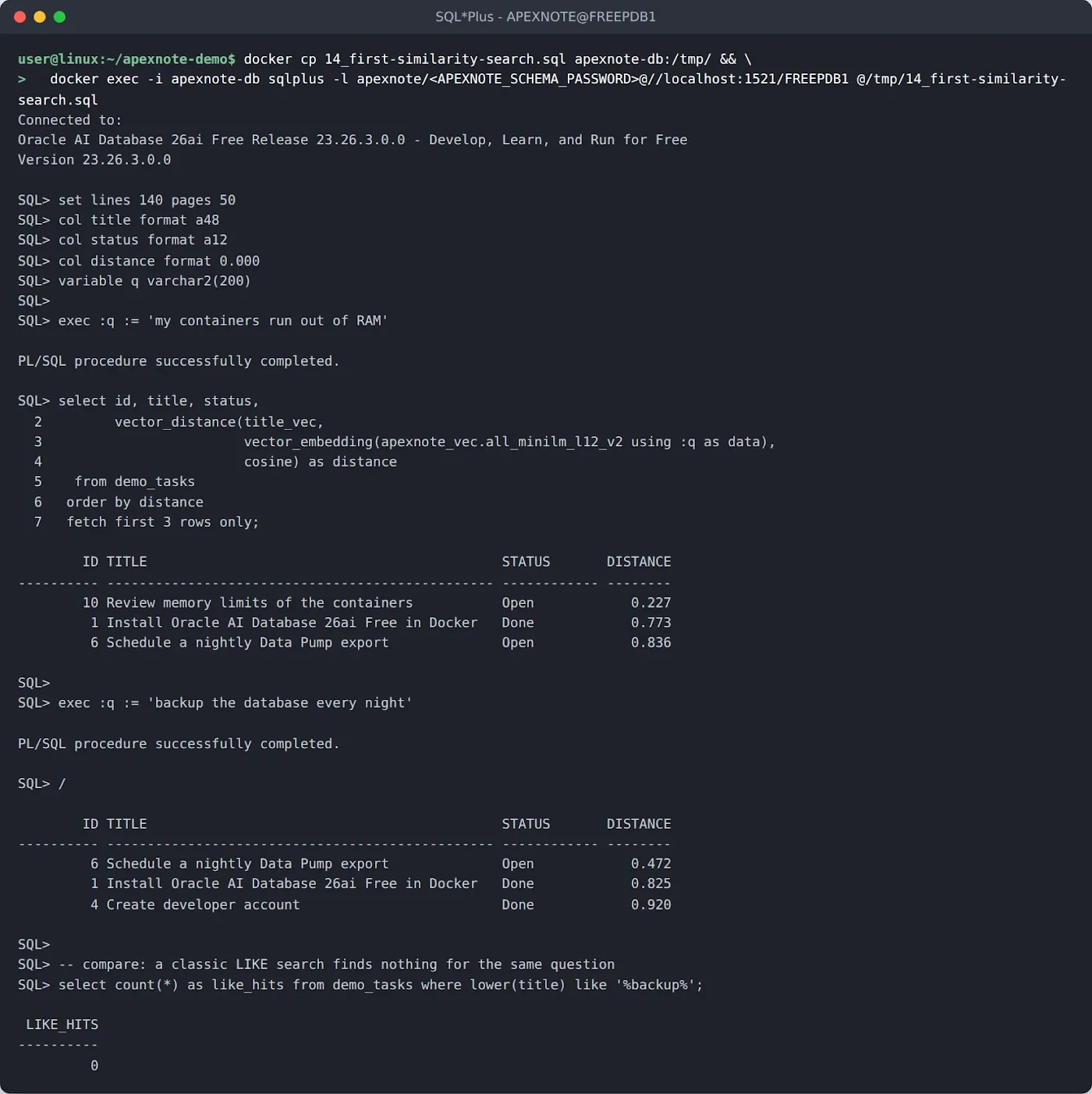
LIKE '%backup%' finds nothing, because the word backup is not in any title.And because it is just SQL, it works everywhere APEX runs SQL. Here is the same query in SQL Workshop, logged in as the developer account from part 1.
select title, status,
round(vector_distance(title_vec,
vector_embedding(apexnote_vec.all_minilm_l12_v2
using 'the server is running out of memory' as data),
cosine), 3) as distance
from demo_tasks
order by distance
fetch first 3 rows only

Keep the Vectors in Sync
New tasks come from the APEX form, and titles get changed. The vector has to follow without anybody thinking about it. A trigger is the simplest way, so I wrote the obvious one.
create or replace trigger demo_tasks_vec_biu
  before insert or update of title on demo_tasks
  for each row
begin
  :new.title_vec := vector_embedding(apexnote_vec.all_minilm_l12_v2 using :new.title as data);
end;
/
show errors
Warning: Trigger created with compilation errors.

LINE/COL ERROR
-------- -----------------------------------------------------------------
2/86     PLS-00103: Encountered the symbol "AS" when expecting one of the
         following:
         )

ERROR at line 1:
ORA-04098: trigger 'APEXNOTE.DEMO_TASKS_VEC_BIU' is invalid and failed
re-validation

VECTOR_EMBEDDING is a SQL function. Its USING ... AS data syntax does not exist in a PL/SQL expression, so the compiler stops at the AS. The fix is to call it through SQL with SELECT ... INTO.
create or replace trigger demo_tasks_vec_biu
  before insert or update of title on demo_tasks
  for each row
begin
  select vector_embedding(apexnote_vec.all_minilm_l12_v2 using :new.title as data)
    into :new.title_vec
    from dual;
end;
/
show errors

insert into demo_tasks (title, priority, owner) values ('Renew the TLS certificate of the web server', 'High', 'Demo Admin');
update demo_tasks set title = 'Review memory and CPU limits of the containers' where id = 10;
commit;

set lines 140
col title format a48
select id, title, vector_dimension_count(title_vec) as dims from demo_tasks  where id = 10 or title like 'Renew%' order by id;

A trigger with compilation errors does not just do nothing. It blocks every DML on the table. In a real application that is an outage for every user of that page. I now create triggers like this one in a disabled state, test them, and enable them only when show errors is clean.
Then the real test. Does the Task Board app from part 1 still work with the new column and the trigger? I changed the title of the task "Document stop/start commands" in the APEX form.


set lines 140 pages 50
col title format a50
col distance format 0.000
select title,
       vector_distance(title_vec,
                       vector_embedding(apexnote_vec.all_minilm_l12_v2 using 'how do I restart everything?' as data),
                       cosine) as distance
  from demo_tasks
 order by distance
 fetch first 3 rows only;
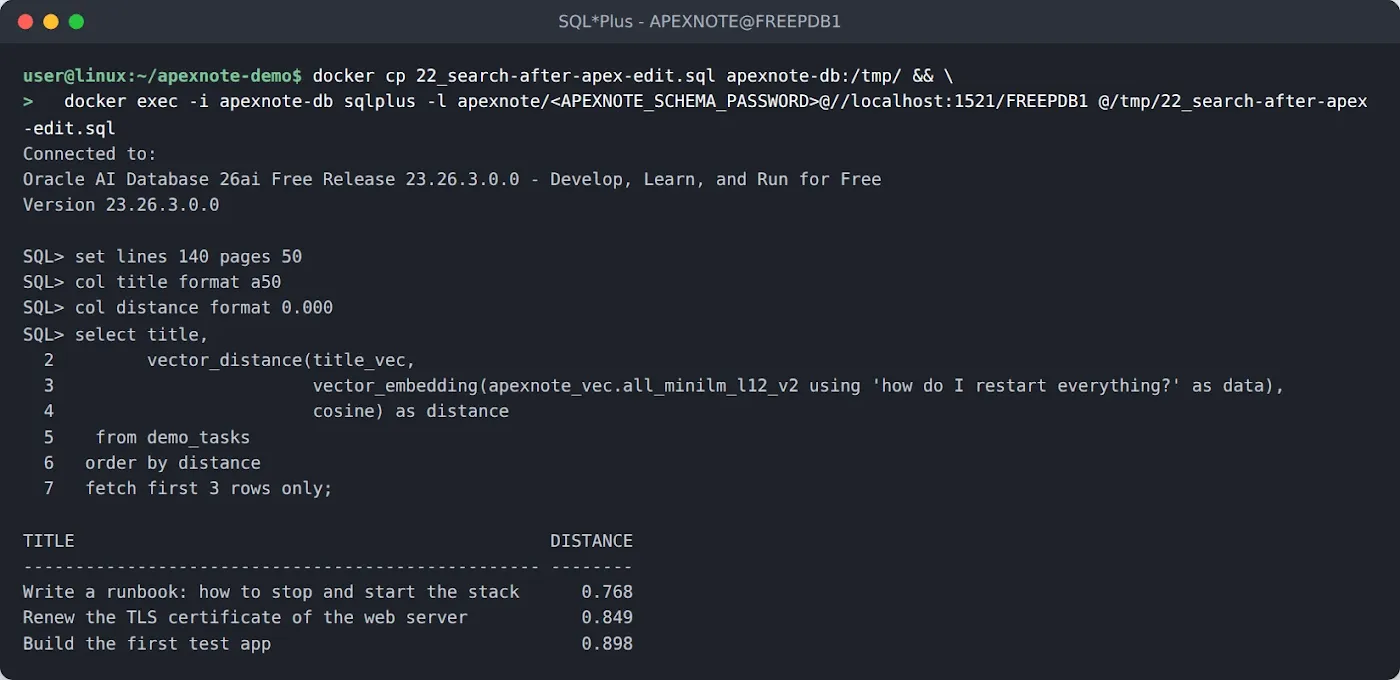
Troubleshooting. The Three Errors I Hit
| Error | Where | Real cause | Fix |
|---|---|---|---|
| ORA-51810 Insufficient buffer size for VECTOR to CHAR or VARCHAR conversion | FROM_VECTOR(v) | Default return type is VARCHAR2(4000), a 384 dimension vector as text is longer | FROM_VECTOR(v RETURNING CLOB) |
| ORA-40284 model does not exist | Model used from another schema | Missing grant, the model exists | GRANT SELECT ON MINING MODEL owner.model TO app_schema |
| PLS-00103 Encountered the symbol "AS", then ORA-04098 on every DML | Trigger with :new.x := vector_embedding(...) | VECTOR_EMBEDDING is SQL only | SELECT vector_embedding(...) INTO :new.x FROM dual |
Typing SQL into APEX SQL Commands, the editor closes brackets for you, so pasted or typed queries can end with extra )). And if a load fails because the file can not be read, check the path from inside the container (docker exec apexnote-db ls -l /opt/oracle/oradata/models), not on the host.
Speed and Memory
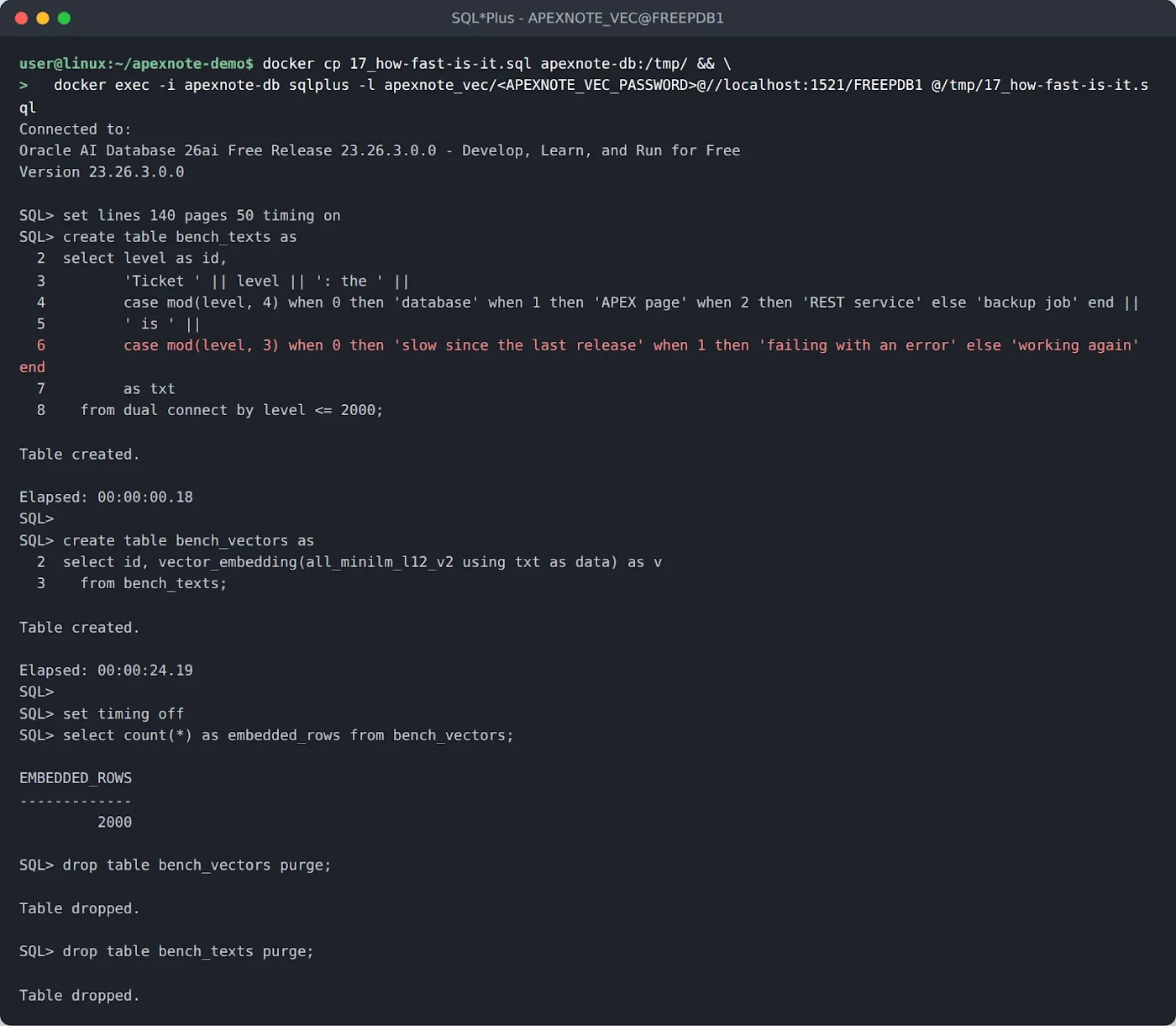
Ten rows are not a benchmark, so I generated 2,000 short support ticket sentences and embedded all of them in one statement.
set lines 140 pages 50 timing on
create table bench_texts as
select level as id,
       'Ticket ' || level || ': the ' ||
       case mod(level, 4) when 0 then 'database' when 1 then 'APEX page' when 2 then 'REST service' else 'backup job' end ||
       ' is ' ||
       case mod(level, 3) when 0 then 'slow since the last release' when 1 then 'failing with an error' else 'working again' end
       as txt
  from dual connect by level <= 2000;

create table bench_vectors as
select id, vector_embedding(all_minilm_l12_v2 using txt as data) as v
  from bench_texts;

set timing off
select count(*) as embedded_rows from bench_vectors;
drop table bench_vectors purge;
drop table bench_texts purge;
Table created.
Elapsed: 00:00:00.18

Table created.
Elapsed: 00:00:24.19

EMBEDDED_ROWS
-------------
         2000

.onnx file from the container.set lines 140 col title format a48 col distance format 0.000 select title, vector_distance(title_vec, vector_embedding(apexnote_vec.all_minilm_l12_v2 using 'SSL expires soon' as data), cosine) as distance from demo_tasks order by distance fetch first 1 row only;

| What | Measured |
|---|---|
| Download (zip) | 117 MB, 5.5 s |
| Model in the database | 127.1 MB |
Load with LOAD_ONNX_MODEL | 2.78 s, RAM peak +0.4 GiB |
| First embedding in a new session | 0.81 s |
| Every embedding after that | about 10 ms |
| 2,000 sentences in one statement | 24.2 s, one core at 100 % |
| Database container RAM, idle after all tests | 2.6 GiB of 4 GiB (part 1 was 2.05 GiB) |
| Changes to the memory limits from part 1 | none |
The 0.81 seconds for the first call matter for APEX. Every APEX request can land on a different database session, so the very first search after a quiet period can feel slower. In my tests the following ones were instant.
What About Other Languages?
Many of my customers write their tasks in German, so I had to try it. Same question as in step 11, only in German.
set lines 140 pages 50
col title format a50
col distance format 0.000
select title,
       vector_distance(title_vec,
                       vector_embedding(apexnote_vec.all_minilm_l12_v2 using 'Den Arbeitsspeicher der Container erhöhen' as data),
                       cosine) as distance
  from demo_tasks
 order by distance
 fetch first 3 rows only;

For anything that is not English, Oracle offers prebuilt multilingual models on the same documentation page, for example multilingual-e5-small. The steps are exactly the same, only the file name, the model name and the number of dimensions in your column change. Check USER_MINING_MODEL_ATTRIBUTES after the load, like in step 6, and use that number.
Semantic search, similar records, smart suggestions or chat with your own data. We build AI features into Oracle APEX applications that run inside your database. Get in touch.
What Comes Next
The database can now understand text. The task "Build semantic search page" is still open in the Task Board, and that is part 3.
- A real search page in APEX. One search field, results ranked by meaning, with the distance as a relevance score.
- A vector index. With ten rows a full scan is fine. With a hundred thousand it is not. That is where
vector_memory_size = 0from part 1 comes back. - Better input. Short titles give the model little context. We will embed descriptions and combine them with normal filters like status and owner.
Final Thoughts
What surprised me most is how ordinary it feels. The model is a database object. You grant it like a table, it ends up in your exports, and you use it with a SQL function in a normal SELECT, a trigger or an APEX report. No Python service next to the database, no API key in a credential store, no per-call bill.
It is not magic either. A small English model has limits, and you see them in the distances. For many APEX applications it is still a big step up from LIKE '%word%', and the data never leaves the server it already lives on.
If you try this and hit an error that is not in my list, write to me. I read every message.
{fullWidth}